

Introduction
Hello Friends, In this blog post(Python Loops Explained), I am going to tell you about Loops in the Python language.
Loops one of the very important concepts and play a very important role in Programming.
It reduces the burden on developers to repeat and write the same piece of code again and again in the program.
So Loops makes your program more powerful, organized, and efficient.
Loops help you in programming generally with processing information, displaying data, and automating tasks.
And it becomes very important for beginners to have a powerful understanding of the loops because of their crucial role in Python programming.
We are letting you know about the for and while loops, specifically in this blog post.
We will definitely try to explain it in a very simple and beginner-friendly way.
What Are Loops in Python? / Python Loops Explained
A loop is a programming structure that repeats a block of code multiple times until a condition is met.
Instead of writing repetitive code manually, loops help automate repeated actions efficiently.
Why Loops Are Important
- Reduce repetitive coding
- Save time and effort
- Make programs shorter and cleaner
- Improve automation and efficiency
Loops are used in almost every type of software application.
Types of Loops in Python
Python mainly provides two types of loops:
forloopwhileloop
Both loops repeat code, but they are used in different situations.
Understanding the for Loop
What Is a for Loop?
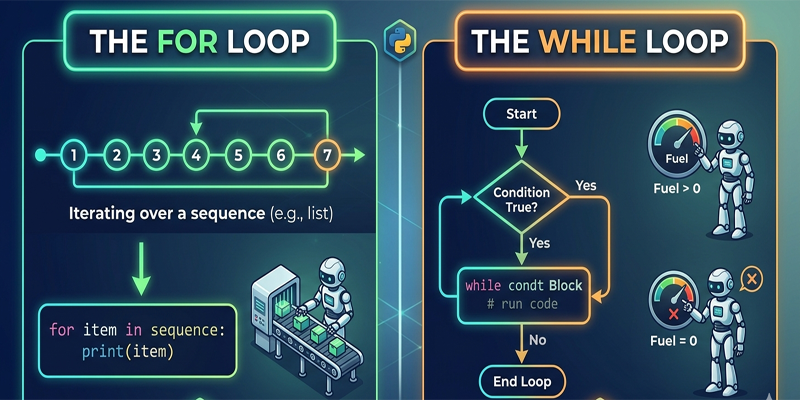
A for A loop is used when you want to repeat code a specific number of times or iterate through a sequence like a list or string.
Basic Syntax of for Loop
for variable in sequence:
    # code block
Simple Example
for i in range(5):
    print(i)
Output
0
1
2
3
4
This loop runs five times and prints numbers from 0 to 4.
Using a for Loop with Lists
fruits = ["Apple", "Banana", "Mango"]

for fruit in fruits:
    print(fruit)
Output
Apple
Banana
Mango
This is useful for working with collections of data.
Advantages of the for Loop
- Easy to use
- Best for fixed repetitions
- Great for lists, strings, and sequences
- Cleaner and more readable code
Understanding the While Loop
What Is a while Loop?
A while loop repeats code as long as a condition remains true.
It is useful when the number of repetitions is not fixed in advance.
Basic Syntax of the while Loop
while condition:
    # code block
Simple Example
count = 1

while count <= 5:
    print(count)
    count += 1
Output
1
2
3
4
5
This loop continues until the condition becomes false.
How the While Loop Works
- Python checks the condition
- If true, the code runs
- The condition is checked again
- The process repeats until the condition becomes false
Advantages of the While Loop
- Flexible for dynamic conditions
- Useful when repetitions are unknown
- Commonly used in games and user input systems
Difference Between for Loop and while Loop
| Feature | for Loop | while Loop |
|---|---|---|
| Best For | Fixed repetitions | Unknown repetitions |
| Simplicity | Easier | Slightly complex |
| Common Use | Lists and sequences | Conditional repetition |
Both loops are important and widely used in Python programming.
Loop Control Statements
1. break Statement
The break The statement stops the loop immediately.
Example:
for i in range(10):
    if i == 5:
        break
    print(i)
2. continue Statement
The continue statement skips the current iteration.
Example:
for i in range(5):
    if i == 2:
        continue
    print(i)
Nested Loops in Python
A loop inside another loop is called a nested loop.
Example:
for i in range(3):
    for j in range(2):
        print(i, j)
Nested loops are useful for working with patterns, tables, and matrices.
Common Mistakes Beginners Make
1. Infinite Loops
A while A loop without proper condition updates can run forever.
Incorrect Example:
count = 1

while count <= 5:
    print(count)
Here, count never changes.
2. Wrong Indentation
Python uses indentation to define blocks of code.
Incorrect indentation causes errors.
3. Using the Wrong Loop Type
Using a while loop when a for A loop would be simpler, but it can make code harder to read.
Real-Life Uses of Loops
Loops are used in many real-world applications:
- Displaying website data
- Processing files
- Automating repetitive tasks
- Building games
- Data analysis
- Sending notifications
Without loops, programming would become extremely repetitive and inefficient.
Tips for Learning Python Loops
Practice Small Examples
Start with simple number-printing programs before moving to complex tasks.
Experiment with Conditions
Modify loops and observe different outputs.
Use Real Projects
Projects help you understand how loops work in practical applications.
What to Learn After Loops
After mastering loops, beginners should move on to:
- Functions
- Lists and dictionaries
- File handling
- Exception handling
- Object-oriented programming
These topics help build stronger programming skills.
Conclusion
So, Friends, in this blog post(Python Loops Explained), we have gone through the Loops, which are the most powerful tools in Python. For making programs more efficient, simplifying code, and automating repetitive tasks, they play an important role.
For condition-based repetition, the “while” loop is best. And for fixed repetitions and sequences, “for” loop is outstanding. A good Python programmer must have knowledge of both loops.
Once you start playing with the loops at ease, you find it very easy to write even a complex Python program, and enjoyable too.
In the case of any queries, you can write to us at support@a5theory.com we will get back to you ASAP.
Hope! You would have enjoyed this post(Python Loops Explained).
Please feel free to give your important feedback in the comment section below.
Have a great time!