

Introduction
Hello Friends, In this blog post(Python Variables Explained), I am going to tell you about Python variables.
To start your Python programming journey, variables are the first concept that you will encounter.
Though variables are the fundamental part of each programming language.
The main work of variables is to store the data and manage it in the program efficiently when needed.
Variables are very important to understand, especially for beginners, as they are used in almost every Python program.
So we are going to explain the Python variables in a very easy way so that a beginner can also understand easily.
We will also provide you with examples of it and will let you know about the common mistakes needed to avoid while programming.
What Are Variables in Python? / Python Variables Explained
In any program, variables are the blocks, chunks, or containers that have the ability to store data.
Basically, programmers store information in these variables and use them later in the program.
This variable data can also be modified and displayed if needed.
For example:
name = "John"In this example:
nameis the variable"John"is the value stored inside the variable
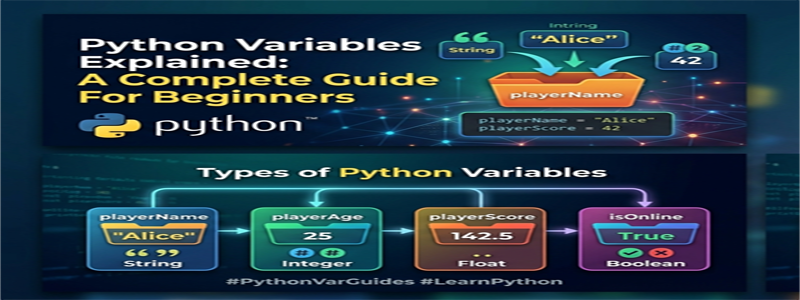
You can think of a variable as a labeled box that stores information.
Why Variables Are Important
To make any program dynamic and flexible, we need variables.
And it is better to store a value or data in a variable and use it wherever needed in the program rather than…
… writing it again and again in the same program, which would never be a good practice in programming.
Benefits of Using Variables
- Makes code easier to read
- Helps store and manage data
- Reduces repetition in programs
- Makes programs more interactive
To write the complex programs without variables would be very difficult, if not almost not possible.
How to Create Variables in Python
Variable declaration inside Python is very easy as you don’t need to specify a data type separately.
Basic Syntax
variable_name = valueExamples
age = 25
city = "New York"
price = 99.99
Python automatically understands the type of value stored.
Types of Variables in Python
1. String Variables
Strings store text values.
Example:
language = "Python"2. Integer Variables
Integers store whole numbers.
Example:
year = 20263. Float Variables
Floats store decimal numbers.
Example:
temperature = 36.54. Boolean Variables
Booleans store only two values:
- True
- False
Example:
is_logged_in = TrueRules for Naming Variables
Python has some simple rules for naming variables.
Valid Variable Names
user_name = "Alex"
studentAge = 20
Invalid Variable Names
2name = "John"
user-name = "Alex"
Important Rules
- Variable names cannot start with numbers
- Spaces are not allowed
- Special characters like
-are not permitted - Use meaningful names whenever possible
How to Print Variables
The print() The function is used to display variables on the screen.
Example:
name = "John"
print(name)
Output:
JohnYou can also print multiple variables:
name = "John"
age = 25

print(name, age)
Changing Variable Values
Variables can be updated anytime during program execution.
Example:
score = 10
score = 20

print(score)
Output:
20The old value gets replaced with the new one.
Multiple Variable Assignment
Python allows assigning values to multiple variables in one line.
Example:
x, y, z = 1, 2, 3This makes the code shorter and cleaner.
Common Mistakes Beginners Make
1. Using Quotes Incorrectly
Incorrect:
name = JohnCorrect:
name = "John"Text values must be inside quotation marks.
2. Confusing Variable Names
Using unclear names like:
a = 100Instead, use meaningful names:
student_marks = 100Readable code is easier to maintain.
3. Using Reserved Keywords
Python keywords cannot be used as variable names.
Incorrect:
class = "Python"Best Practices for Using Variables
Use Descriptive Names
Good variable names improve code readability.
Keep Naming Consistent
Choose a naming style and follow it throughout the project.
Avoid Very Long Names
Variable names should be clear but not unnecessarily lengthy.
Real-Life Example of Variables
Imagine creating a simple student information program.
Example:
student_name = "Alex"
student_age = 18
student_marks = 85

print(student_name)
print(student_age)
print(student_marks)
This demonstrates how variables help organize information effectively.
What to Learn Next
After understanding variables, beginners should move on to:
- Data types
- User input
- Conditional statements
- Loops
- Functions
These concepts build the foundation of Python programming.
Conclusion
So, Friends, in this blog post(Python Variables Explained), we have seen Python variables with examples. Variables are an essential stuff and initializer blocks in Python programming. You can easily store, manage, and manipulate data effectively, and this makes your program more interactive and flexible.
If beginners want to command this language, they must learn and understand the variable concepts first. Mastering the variables could provide them with a high level of comfort in coding. So do a regular practice of variables and keep experimenting with them. Start with simple and small programs and use variables in them with modifications of values in them. It will surely skill up your programming understanding.
If you become sound and confident with variable use, the rest of the programming or advanced programming would be very easy for you.
If you have any queries, you can write to us at support@a5theory.com. We will get back to you ASAP.
Hope! You would have enjoyed this post(Python Variables Explained).
Please feel free to give your important feedback in the comment section below.
Have a great time!