

Introduction
Hello Friends, In this blog post (How to Make Your First Python Program), we are going to discuss your first Python program.
You usually make a program after going through a few tutorials and gaining a little bit of understanding of the language and platforms.
New people often get confused and excited at the same time when they are just about to start programming.
Python is a very simple language because its syntax is easy to read and understand.
And that’s the reason most of the beginners choose this language over all other available languages.
If you are very new to programming and have not tried or even coded a single program, then Nothing could be better than this Python language to start and learn your programming fundamentals.
So, before you learn how to write and run your Python program, we will let you know how to set up Python successfully first
Why Python Is Best for Beginners
The simplicity of the Python language is the main reason beginners love it.
Python is used by many major technical organisations worldwide in domains such as…
… web development, automation, artificial intelligence, cybersecurity, and data science.
This diversity also makes it popular over other languages.
Benefits of Learning Python
- Easy-to-read syntax
- Beginner-friendly structure
- Large community support
- Used in many technology fields
- Great for both simple and advanced projects
Beginners do not deal with the complicated, difficult-to-understand syntax.
So they get enough time and energy saved to focus on logic and problem-solving.
How to Make Your First Python Program?
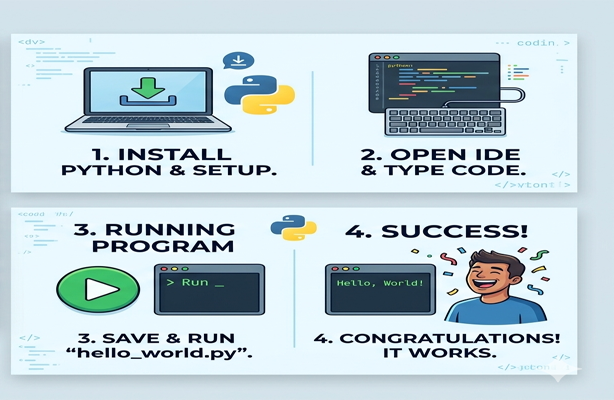
Step 1: Install Python
First, you need to install Python on your computer before writing your first program.
How to Install Python
- Visit the official Python website
- Download the latest stable version
- Run the installer
- Select the option: “Add Python to PATH”
- Complete the installation process
Once the installation is finished, you are ready to use Python on your computer system.
Step 2: Choose a Code Editor
With the help of a code editor, you can easily write your program and manage it more efficiently.
Popular Editors for Beginners
- VS Code
- PyCharm
- Sublime Text
- IDLE (comes with Python)
For beginners, VS Code and IDLE are simple and easy to start with.
Step 3: Write Your First Python Program
Now comes the exciting part—writing your first Python code.
Your First Program
print("Hello, World!")This simple line tells Python to display the text “Hello, World!” on the screen.
Step 4: Save and Run the Program
After writing the code:
- Save the file with a
.pyextension
Example:firstprogram.py - Run the program using:
- The editor’s run button, or
- Command Prompt / Terminal
Expected Output
Hello, World!A big Congratulations! You have successfully created and executed your first Python program.
Understanding the Code
Now we see what this program actually does step by step.
The print() Function
The print() The function is used to display output on the screen.Example:
print("Welcome to Python")Output:
Welcome to PythonAnything written inside quotation marks is treated as text.
Step 5: Experiment with Small Changes
The only solid and efficient way to learn programming is by experimentation.
Try These Examples
print("My name is Alex")print(10 + 5)print("Python is fun!")You can learn Python behaviour more by making some modifications to the code.
So try as much as you can and see the changes.
Common Mistakes Beginners Make
1. Forgetting Quotation Marks
Incorrect:
print(Hello)Correct:
print("Hello")2. Using Wrong File Extension
Python files must end with .py.
3. Typing Errors
You should be very cautious with this, as languages are very sensitive to syntax, spelling, or case sensitivity. Sometimes, a very small mistake can create an error.
Why Practice Is Important
You must have heard the saying “Practice makes perfect.” So, as much as you practice, the better you will become. Learning programming is similar to learning a new language.
Simple Practice Ideas
- Create a greeting program
- Build a basic calculator
- Display your favourite quote
- Print different numbers and text combinations
Practice regularly enhances your self-confidence and problem-solving skills.
What to Learn After Your First Program
Having a sound enough in basic programming, you can move ahead towards:
- Variables and data types
- User input
- Conditional statements
- Loops
- Functions
- Lists and dictionaries
In building some more advanced applications, these concepts will really help you a lot.
Tips for Beginners
Stay Consistent
This is the main key factor in order to be a perfect programmer. Be consistent with your coding. You don’t need to code for a long time, but make sure you practice it every day regularly, even for 15-30 min.
Do Not Fear Errors
Errors need to be considered as a normal part of programming. Every error makes you learn something new.
Build Small Projects
Working on small projects really builds your understanding and logic strong enough. And once you learn to command it, you really enjoy coding.
Conclusion
So, Friends, in this blog post(How to Make Your First Python Program), we have learned how to make your first Python program. Python has been the most popular programming language across the world. Having a very simple and understandable syntax structure made it an outstanding choice amongst the beginners without any doubt.
The strategy to learn Python successfully is very easy and quick. First, go through some tutorials and video tutorials. Try some code, keep your practice consistent, and then try working on some small projects. Because every polished and sound developer or programmer around the world started their programming with the “Hello World” program.
In the case of any queries, you can write to us at support@a5theory.com we will get back to you ASAP.
Hope! You would have enjoyed this post(How to Make Your First Python Program).
Please feel free to give your important feedback in the comment section below.
Have a great time!