

Hello Friends, in this blog post(How Does the Internet Work), we are going to discuss the working of the most dynamic and amazing technology of today’s world, that is the internet.
The internet helps us connect and communicate with the whole world 24×7. |How Does the Internet Work|
If you are looking for any website details, then you just type the website name using your phone, and you instantly get the whole webpage of that website. |How Does the Internet Work|
But there are a few obvious questions which would definitely come to your mind, like:
- Where was that webpage before you opened it?
- How did your phone find the correct computer?
- How did billions of pieces of information travel across cities, countries, and oceans and reach your device almost instantly?
And the one answer we can give for all the questions asked above would be only “Internet”.
Today, almost everyone with a mobile is using the internet. But very few people are curious to know…
… the amazing science and engineering behind how the internet is making all this functionality possible. |How Does the Internet Work|
In this post(How Does the Internet Work), we will discuss the full journey from a simple search request from your phone to the responses you get back into your phone via website servers. |How Does the Internet Work|
What Is the Internet?
The internet is a global network of interconnected computer networks.
It connects:
- Smartphones
- Computers
- Servers
- Data centers
- Routers
- Satellites
- Undersea cables
- Other networked devices
These systems communicate using agreed technical rules called protocols.
The internet is not one giant computer.
It is a huge collection of interconnected networks working together.
Internet vs World Wide Web
These two terms are often used as if they mean the same thing.
They don’t.
Internet
The physical and logical network infrastructure that allows devices to communicate.
World Wide Web
A service that runs on the internet and allows people to access websites and webpages.
The web is therefore part of the internet, not the entire internet.
Other services such as email, online gaming, video calls, and file transfers also use the internet.
What Happens When You Open a Website?
Suppose you type:
into your browser.
A simplified journey looks like this:
Your Phone → Wi-Fi/Cellular Network → Router → Internet Service Provider → Internet Backbone → Server → Your Phone
But several important steps happen along the way.
Step 1: Your Device Connects to a Network
Your smartphone or computer first needs a connection.
This could be:
- Wi-Fi
- Mobile data
- Ethernet
- Another network connection
If you’re using Wi-Fi, your device communicates wirelessly with a Wi-Fi router or access point.
If you’re using mobile data, your phone communicates with a nearby cellular network.
Step 2: Your Request Leaves Your Home
If you’re using Wi-Fi, the request normally travels from your device to your local router.
The router acts as a traffic director.
It helps send data from your local network toward the wider internet.
Step 3: Your Internet Service Provider Takes Over
Your router connects to your Internet Service Provider (ISP).
The ISP provides the connection between your local network and larger networks.
From there, your data may travel through several interconnected networks before reaching its destination.
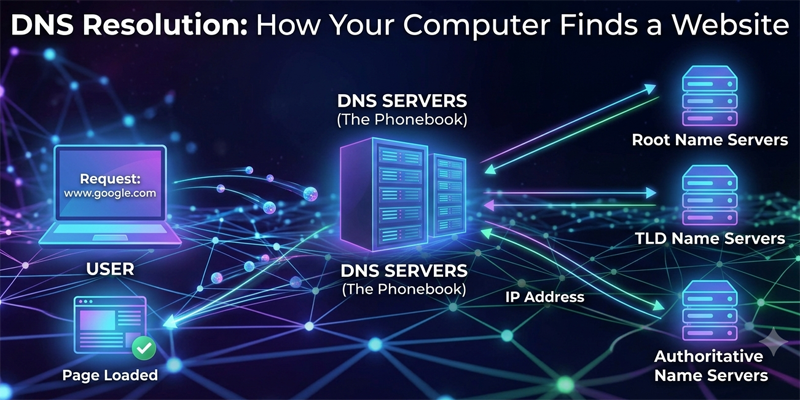
Step 4: How Does Your Phone Find the Website?
You entered a human-friendly name such as:
Computers communicate using IP addresses.
So how does your device convert the website name into an IP address?
This is where DNS comes in.
What Is DNS?
DNS stands for Domain Name System.
You can think of DNS as the internet’s address directory.
Humans prefer names like:
google.com
Computers use numerical or other machine-readable network addresses.
DNS helps translate the domain name into the address needed to reach the correct service.
Why Don’t We Just Use IP Addresses?
Imagine having to remember:
142.250.xxx.xxx
instead of:
google.com
It would be much harder.
Domain names make the internet easier for humans to use.
Step 5: Your Data Is Broken Into Packets
A webpage isn’t usually sent as one giant piece of data.
The information is divided into smaller units called packets.
Each packet can contain information about:
- Where it came from
- Where it is going
- Part of the data
- Information needed to handle the transmission
Breaking information into packets makes large-scale network communication much more efficient.
What Is a Packet?
Think of sending a large book across a country.
Instead of sending the entire book as one giant object, you could divide it into many numbered packages.
Each package could travel through the delivery network and eventually be assembled into the complete book.
Internet packets work on a similar principle.
Step 6: Routers Decide Where Packets Go
The internet contains enormous numbers of routers.
A router examines network information and decides where packets should be forwarded next.
Different packets can sometimes take different routes.
This is one reason the internet is remarkably resilient.
If one route becomes unavailable, network traffic can potentially be redirected through another route.
Step 7: Data Can Cross Oceans
Here’s something most people don’t realize.
A huge amount of global internet traffic travels through undersea fiber-optic cables.
These cables lie on the ocean floor and connect continents.
They carry enormous amounts of information using pulses of light.
How Does a Fiber-Optic Cable Work?
Fiber-optic cables contain extremely thin strands of glass or other optical material.
Data is transmitted using light signals.
A simplified process is:
Electrical Data → Light Pulses → Fiber Cable → Light Detection → Electrical Data
Because light can travel extremely rapidly through optical fiber and the fibers can carry enormous amounts of information, fiber optics form the backbone of much of the modern internet.
Why Don’t We Use Satellites for Everything?
Satellites are extremely useful, especially for:
- Remote locations
- Ships
- Aircraft
- Emergency communication
- Areas without terrestrial infrastructure
But for many internet connections, fiber-optic networks provide advantages in capacity and latency.
Satellite internet has improved dramatically, especially with modern low-Earth-orbit satellite systems.
Step 8: Your Request Reaches a Server
Eventually, your request reaches a computer system that can provide the requested content.
This may be a web server or a larger cloud/data-center infrastructure.
A server is simply a computer system that provides services or resources to other computers.
For a website, the server may store or generate:
- HTML
- CSS
- JavaScript
- Images
- Videos
- Databases
- Other application data
What Is a Data Center?
A data center is a facility containing large numbers of computer systems and supporting infrastructure.
It may contain:
- Thousands of servers
- Network equipment
- Storage systems
- Backup power
- Cooling systems
- Security systems
Large internet services may operate data centers in multiple locations around the world. |How Does the Internet Work|
Step 9: The Server Sends the Information Back
The server processes your request and sends the required information back.
The response travels through networks toward your device.
Again, the information may be divided into packets.
Your device receives the packets and reconstructs the information.
Step 10: Your Browser Builds the Webpage
Your browser receives information such as:
- HTML
- CSS
- JavaScript
- Images
- Fonts
- Other resources
It processes these files and renders them into the webpage you see.
So when a webpage appears on your screen, your browser has actually performed a significant amount of work.
What Is a Browser?
A browser is software that allows you to access and interact with websites.
Examples include:
- Google Chrome
- Mozilla Firefox
- Microsoft Edge
- Apple Safari
The browser communicates with web servers and interprets web technologies to display webpages.
What Is HTTPS?
You may notice:
https://
at the beginning of a website address.
HTTPS means Hypertext Transfer Protocol Secure.
It uses encryption to protect communication between your browser and the website.
Encryption makes it much harder for someone intercepting network traffic to understand the protected information.
This is especially important for:
- Passwords
- Banking
- Shopping
- Personal information
- Login sessions
What Is an IP Address?
An IP address is a network address used to identify a device or network interface within an IP network.
There are two major versions:
IPv4
Uses addresses such as:
192.168.1.10
IPv6
Uses a much larger address space, for example:
2001:db8::1
IPv6 was developed partly because the number of available IPv4 addresses is limited.
What Is Wi-Fi?
Wi-Fi allows devices to communicate wirelessly over relatively short distances using radio waves.
Your phone sends and receives data through radio signals to and from a compatible wireless access point.
The access point then connects that traffic to the broader network.
So:
Wi-Fi is not the internet.
Wi-Fi is one method of connecting your device to a network that may provide internet access.
Wi-Fi vs Mobile Internet
Wi-Fi
Usually connects your device to a nearby wireless access point.
Mobile Internet
Connects your device to a cellular network using technologies such as 4G or 5G.
Both can provide access to the internet.
Why Is the Internet So Fast?
Modern internet systems combine several technologies:
- Fiber-optic cables
- High-speed processors
- Powerful routers
- Efficient communication protocols
- Data centers
- Content delivery networks
- Caching
- Advanced compression
- High-capacity wireless networks
The result is a global system capable of moving enormous quantities of information every second.
What Is a Content Delivery Network?
A Content Delivery Network (CDN) stores or caches copies of frequently requested content at locations distributed around the world.
Suppose a website’s main server is in the United States, but you are accessing it from India.
A CDN may allow your browser to retrieve some content from a nearby server instead of travelling all the way to the original server.
This can reduce latency and improve loading speed.
Why Does a Website Sometimes Load Slowly?
Many factors can affect webpage speed.
Your Connection
Slow Wi-Fi or mobile data can delay downloads.
Distance
Data travelling long distances can increase latency.
Server Load
A busy server may take longer to respond.
Website Size
Large images and videos require more data.
Network Congestion
Busy network routes can increase delays.
Device Performance
An older device may take longer to process complex webpages.
What Is Latency?
Latency is the time taken for data to travel between two points or for a system to respond.
A connection can have high bandwidth but still experience noticeable latency.
For example, online gaming and video calls often benefit greatly from low latency.
Bandwidth vs Speed
These terms are often confused.
Bandwidth
The amount of data that can theoretically be transmitted over a connection in a given period.
Latency
The delay involved in communication.
A network can have high bandwidth but poor latency—or relatively modest bandwidth with very low latency.
How Does a Video Reach Your Phone?
When you watch an online video, your device usually doesn’t download the entire internet video library.
Instead, it requests portions of the video.
The service sends data continuously or in segments.
Your device stores some of the incoming data temporarily in a buffer.
The video player uses this data to keep playback running smoothly.
How Does Email Work?
When you send an email:
Your Device → Mail Server → Recipient’s Mail Server → Recipient’s Device
Email uses specialized protocols and server systems to deliver messages.
The recipient doesn’t necessarily need to be online at the moment you send the email because the receiving mail server can store the message until the recipient accesses it.
What Happens When You Send a WhatsApp Message?
At a simplified level:
- You type a message.
- Your device prepares the data.
- The data is transmitted through your network.
- Internet infrastructure routes it toward the service.
- The service helps deliver it to the recipient.
- The recipient’s device receives the message.
Modern messaging systems also use encryption and complex server infrastructure to protect and deliver communications.
Does the Internet Travel Through the Air?
Sometimes—but not always.
The internet can reach your device through:
- Wi-Fi radio waves
- Cellular radio waves
- Fiber-optic cables
- Copper cables
- Satellite links
- Other network technologies
But much of the long-distance backbone traffic travels through physical cables, especially fiber optics.
Does the Internet Use Electricity?
Absolutely.
Almost every part of the internet infrastructure requires energy.
Electricity powers:
- Routers
- Servers
- Data centers
- Cellular towers
- Wi-Fi equipment
- Cooling systems
- Network monitoring equipment
This is one reason energy efficiency has become increasingly important in modern computing.
Science Around You
The internet combines concepts from several areas of science and technology:
- Physics → radio waves and light
- Mathematics → data processing and algorithms
- Electronics → circuits and processors
- Computer science → software and protocols
- Materials science → optical fiber and semiconductor technology
- Engineering → networks and data centers
It is one of the best examples of multiple scientific fields working together.
Did You Know?
- Much of the world’s intercontinental internet traffic travels through undersea cables.
- Fiber-optic communication uses pulses of light.
- A webpage can require many separate network requests before it fully appears.
- Your browser may communicate with several different servers while loading one webpage.
- The internet can continue functioning even when some network paths fail because it consists of many interconnected networks.
- A data center can contain thousands of servers and require sophisticated cooling and power systems.
Try This at Home
Make a Simple Communication Network
You’ll Need:
- Three or four people
- Paper slips
- Pens
Steps
- Give each person a different “address.”
- Write a short message.
- Divide it into several numbered pieces.
- Give each piece a different route through the group.
- Have the final person reconstruct the message using the numbers.
What It Demonstrates
This simple activity demonstrates ideas behind:
- Data packets
- Addresses
- Routing
- Reassembling information
Real internet networks are vastly more complicated, but the basic concept is similar.
Common Mistakes Students Make
❌ Thinking Wi-Fi and the internet are the same thing.
✔ Wi-Fi is a wireless networking technology; the internet is the global interconnected network.
❌ Thinking all internet data travels through satellites.
✔ Much of the world’s long-distance internet traffic travels through terrestrial and undersea fiber-optic networks.
❌ Thinking websites are stored inside Google.
✔ Websites are hosted on servers or cloud infrastructure operated by different organizations.
❌ Thinking the internet is one giant computer.
✔ The internet is a huge network of interconnected networks and devices.
Frequently Asked Questions (FAQs)
1. How does the internet work?
The internet connects millions of networks and devices that communicate using standardized protocols to exchange data.
2. How does a website reach my phone?
Your browser requests the website, DNS helps locate the appropriate server, network routers forward the data, and your browser processes the returned files.
3. Does Wi-Fi mean I have internet?
Not necessarily. Wi-Fi can connect devices locally even when the internet connection is unavailable.
4. How does data travel between countries?
Much international traffic travels through undersea fiber-optic cables, with satellite and other links also used in specific situations.
5. Why is fiber optic so important?
Fiber optics can transmit enormous quantities of information using light over long distances with relatively low signal loss.
Why This Topic Matters
The internet has transformed:
- Education
- Communication
- Banking
- Healthcare
- Business
- Entertainment
- Scientific research
- Government services
Understanding how it works helps students see that the digital world isn’t magic.
It is the result of physics, mathematics, engineering, and computer science working together.
Conclusion
Friends, in this post(How Does the Internet Work), we have gone through an amazing journey of the internet and understood the full concept of internet works. Now you better understand that the responses on your screen after any search come through an incredible global system of servers.
At first, your request begins as radio waves between the Wi-Fi router and your phone. Then it travels through a network made of fiber-optic cables. After this, it crosses oceans through undersea cables and reaches a server situated at a distant data center. Then the response from the server starts traveling back on the journey to your phone or devices. |How Does the Internet Work|
And the most amazing part of this journey is that this whole process takes hardly a fraction of a second. |How Does the Internet Work|
Normally, you don’t see the workings of the internet, so it seems to be invisible to you. But in actuality, behind every search, message, video, and webpage, there is an outstanding collaboration of light, radio waves, electricity, computers, mathematics, and modern engineering. All work together to make our internet powerful. |How Does the Internet Work|
If you have any queries, you can write to us at support@a5theory.com; we will get back to you ASAP.
Hope! You would have enjoyed this post(How Does the Internet Work).
Please feel free to give your important feedback in the comment section below. |How Does the Internet Work|
Have a great time!