

Hello Friends, In this blog tutorial (How & Where to Place AdSense Code in Your Website), I will guide you on how & where to place your Ad unit on your Website using Google AdSense. / Where can I copy my AdSense code?
It is very important to place your Ad unit in the right place so that you can earn more potential profit from your Google AdSense Ad. |How & Where to Place AdSense Code in Your Website|

Using this blog(How & Where to Place AdSense Code in Your Website), we will focus on:
- Where do I put the AdSense code on my website?
- How do I add advertisements to my website?
- Where can I copy my AdSense code?
- How to add Google AdSense code to my site?
- Where to paste the ad code in your HTML, and a Google AdSense code example?
If you have not created the Google Adsense account and created the Ad unit, then please go through the link below for the same|How & Where to Place Adsense Code in Your Website|
Create an AdSense account with a step-by-step procedure.
How to create an Ad unit in Google AdSense?
What shall we keep in mind before placing the Google AdSense code?
The Google AdSense ad should be placed in such a way that it gets the full attention of your site visitors.
Your ad should be of a medium size, not too large and not too small. Actually, this also depends on the place where you are placing the Ads.
Your Ads should be responsive; otherwise, there should be a sufficient place to set your Ad.
Try to avoid placing the Google AdSense ads just near any image or after any image or link, so that the user does not accidentally click due to the confusion of content, as this is not a good practice to have.
What is the procedure for placing our Google AdSense Ad on our site….? / How do I add Google AdSense code to my site
This is a very simple procedure; you just need to follow the step-by-step procedure given below.
First, log in to your Google AdSense account.
Then click on your Ad unit and copy the code.

Now log in to your Website dashboard or admin panel.
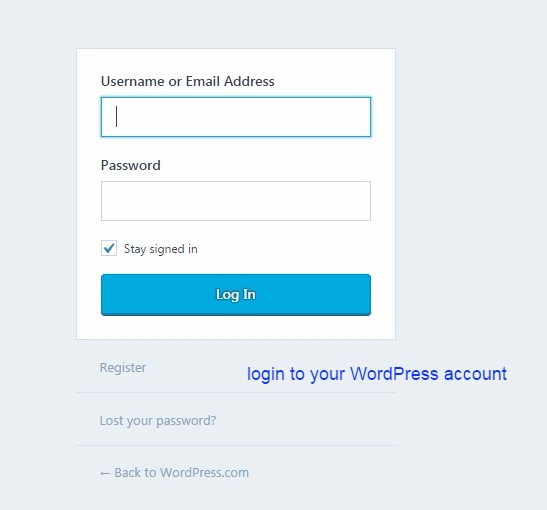
Now you can paste this code at the four most promising places. See the image below.
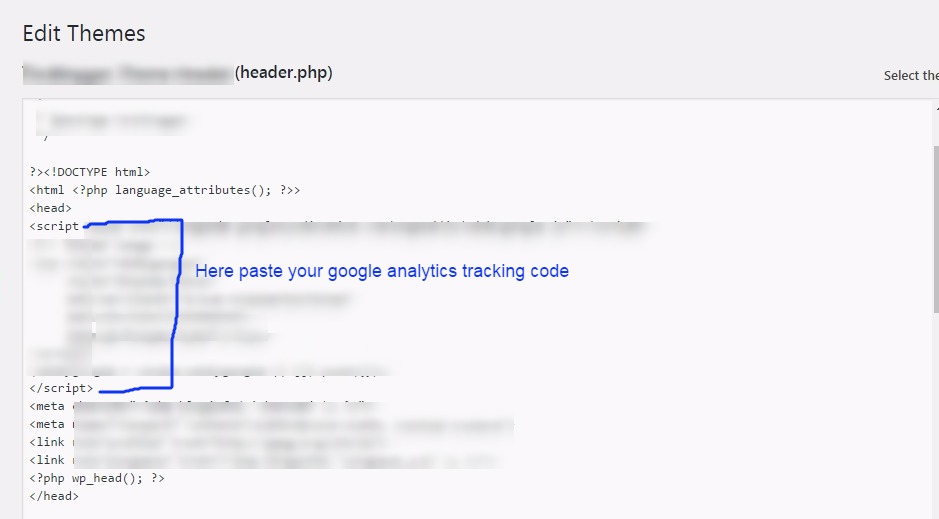
<head> section:

Click on the header.php file here you will get both the head and body sections. See the image below.

Here we are pasting the code inside the head section. See the image below.
<body> section:
This is the same procedure as the head section above, just paste the code inside the body tag, which is just below the head tag.
But for this section, you can create a new Google AdSense Ad unit, as it would be easy to track the performance of your Ad.
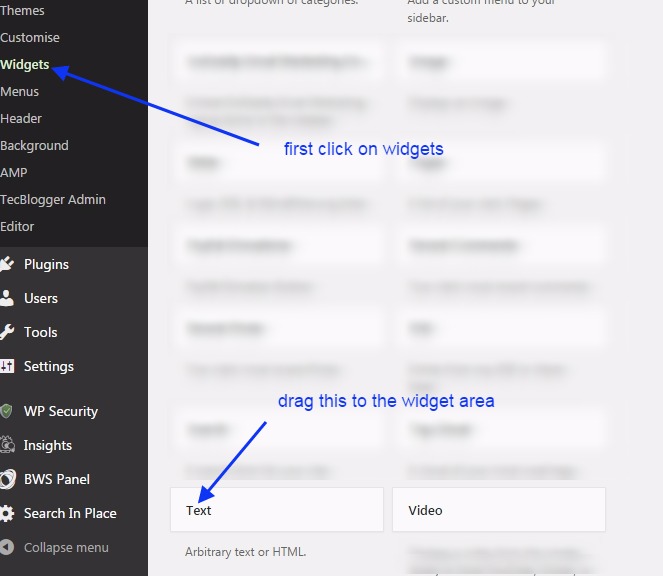
widget area: Click on the widget area. Here, you can drag and drop the text widget to the right sidebar or widget area.
See the image below. Create a new Google AdSense Ad unit for the widget area.
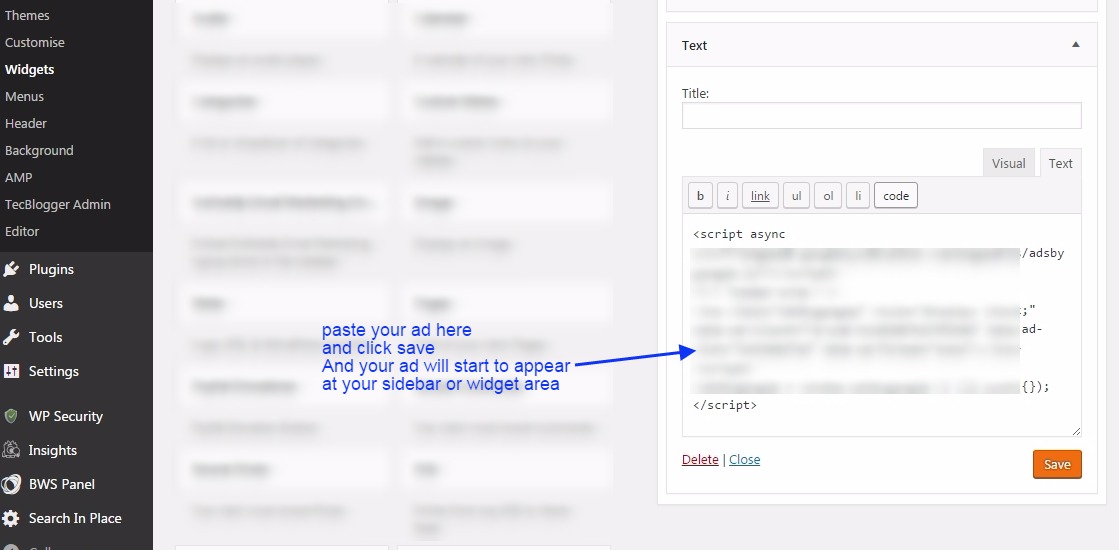
Here you can paste the code for the Ad unit. See the image below.
Post/Pages: Here you can paste the code inside posts or pages. You just need to open the post/page and then open it in text view,…
…and paste the code wherever you need to show it in your post. See the image below.

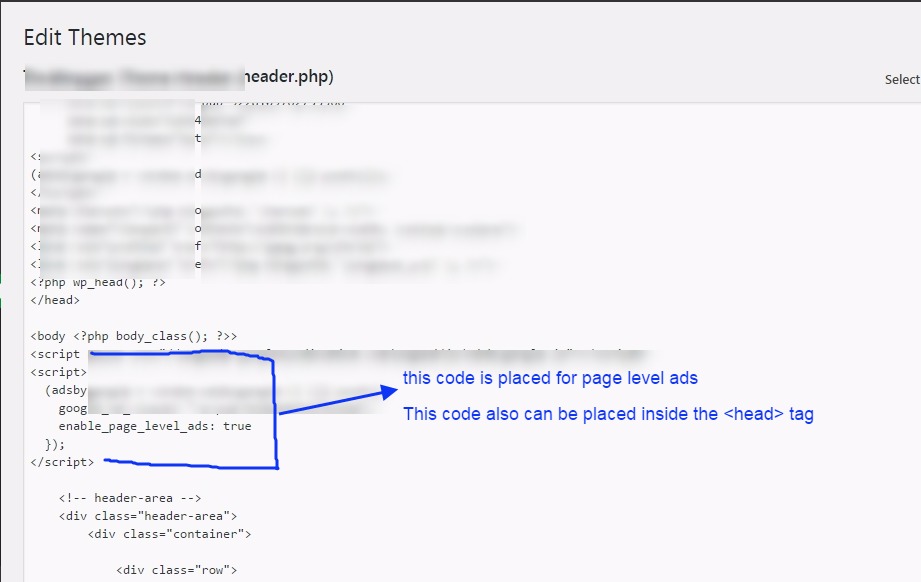
Page-Level-Ads: Here you will see how to place the code for page-level ads. You need to copy the code, and then you can either paste it inside the head or body section.
If you have already added your one Google AdSense ad unit inside the head section of this code, you can add this inside the body section.
Once you place this code inside the body section, ads will start to appear on your website pages. See the image below.

Here we paste this code inside the body tag. See the image below.
Conclusion:
In this blog post (How & Where to Place AdSense Code in Your Website), we explain how and where to place your Google AdSense code on your website or WordPress site. Google Adsense is one of the best affiliate programs for making money online, and it is a highly authentic way to monetize your blogging website or any other video platform, such as YouTube. In this blog, you will learn how to obtain the Google AdSense code and where to place it to start advertising on our website.
We have discovered where to put the AdSense code on my website. How do I add advertisements to my website? Where can I copy my AdSense code? How to add Google AdSense code to my site, Where to paste the ad code in your HTML, Google AdSense code example, How to paste AdSense code in HTML, Connect your site to AdSense WordPress|How & Where to Place AdSense Code in Your Website|
अगर आप adsense के बारें में अभी तक नहीं जानते है और आपने अपना adsense अकाउंट setup नहीं किया है तो आप adsense से रिलेटेड कुछ अच्छे और उपयोगी blogs नीचे दी हुई link से पढ़ सकते है |
If you are still unaware of the Adsense Account, or you have not set it up yet, then you can go through the links below related to the same.
Google Adsense Account Setup in Hindi…
Google AdSense account setup in English
How to enable or set up Google AdSense payment or AdSense address verification PIN?
Have you not received your Google AdSense PIN?
How To Submit Tax Information In Google AdSense in Hindi
How to Submit Tax Information Form in Google Adsense for YouTube and Blog
ADSENSE ADDRESS VERIFICATION PIN: FAQ
Where do I put the AdSense code on my website
How to create Ad units in Google AdSense
If you have any queries, please write to us at a5theorys@gmail.com, and we will respond ASAP.
Hope! You would have enjoyed this post about Google Adsense: How & Where to Place Adsense Code in Your Website?
Please feel free to give your important feedback in the comment section below. |How & Where to Place AdSense Code in Your Website|
Have a great time! Sayonara!
Hello there! Would you mind if I share your blog
with my twitter group? There’s a lot of people that I think
would really appreciate your content. Please let me know. Many thanks
thanks for your comment! sure it would be our pleasure if you share our content…..you can go ahead …:)
Hello just wanted to give you a quick heads up.
The text in your article seem to be running off the screen in Ie.
I’m not sure if this is a formatting issue or something to do
with internet browser compatibility but I thought I’d post to let you know.
The style and design look great though! Hope you
get the issue solved soon. Cheers
Fascinating blog! Is your theme custom made or did
you download it from somewhere? A design like yours with a few
simple adjustements would really make my blog jump out. Please let me know where you got your design. Kudos
Thanks for a marvelous posting! I truly enjoyed reading it, you can be a great author.I will make sure to bookmark your blog
and will often come back in the foreseeable future. I want to encourage you
continue your great job, have a nice evening!
It’s very effortless to find out any topic on net
as compared to textbooks, as I found this piece of writing at
this web site.
I need to to thank you for this wonderful read!! I absolutely loved every bit of it.
I’ve got you bookmarked to check out new stuff you post…
Appreciate the recommendation. Let me try it out.
great issues altogether, you simply received a logo new reader.
What may you recommend in regards to your submit that you just
made some days in the past? Any positive?
Thanks a bunch for sharing this with all people you actually know what you are talking approximately!
Bookmarked. Kindly additionally discuss with my website =).
We will have a link exchange arrangement between us
Howⅾy! Tһis blog post could not be written any
better! Going through this post reminds me of my previou roommate!
He constantly kept talking about this. I mokst certainly will send this information too him.
Pretty sure he’ⅼl haᴠe a good read. Thank you foг sharing!
What a stuff of un-ambiguity and preserveness of valuable experience regarding
unpredicted emotions.
This has been my favourite learn of the day — nicely accomplished.
Having read this I thought it was really enlightening. I appreciate you finding the time and energy
to put this information together. I once again find myself spending a lot of time both reading and posting comments.
But so what, it was still worthwhile!
Your clarification helped me connect the dots I’d missed.
Great tone — skilled but nonetheless heat and personable.
Generally I don’t read post on blogs, however I wish to say that this write-up very compelled me to take a look at
and do so! Your writing style has been surprised me. Thanks, very nice
article.
Reisebusfahrten sind ebenfalls untersagt.
I love your blog.. very nice colors & theme. Did you
design this website yourself or did you hire someone to do it for
you? Plz answer back as I’m looking to design my own blog and would like
to find out where u got this from. appreciate it
Thanks for your comment! yes we made this theme at our end and we also provide the same service of building and customizing theme at very cheaper rate. for more info you can contact us at support@a5theory.com or a5theorys@gmail.com
Quality posts is the secret to interest the
people to pay a quick visit the site, that’s what this website is providing.
Thanks a lot! I appreciate this.
Pretty part of content. I simply stumbled upon your website and
in accession capital to say that I get in fact enjoyed account your blog posts.
Any way I’ll be subscribing on your augment and even I success you access consistently quickly.
Nicely put. Many thanks!
Effectively expressed indeed! .
Wow tons of excellent advice!
Nicely put. Appreciate it!
เนื้อหานี้ช่วยให้เข้าใจเรื่อง ค่ารักษารากฟัน ได้ชัดเจน เหมาะสำหรับคนที่มีอาการปวดฟันหรือฟันผุ และกำลังมองหาคลินิกทันตกรรม พร้อมข้อมูลราคาทำฟัน การครอบฟัน
และการอุดฟัน
Nice post. I was checking continuously this blog and I’m impressed!
Extremely helpful information specially the closing phase 🙂 I take care of
such information much. I was seeking this particular info for a long time.
Thank you and good luck.
Nicely put. Thanks!
You revealed it wonderfully.
You actually revealed that terrifically!
You definitely made the point!
Thank you! Loads of data.
Awesome posts, Thank you.
Really a good deal of very good info.
Valuable stuff Regards.
Fantastic info Kudos.
Развод — это юридический процесс, который
требует внимания к деталям. Процесс развода в 2026 году стал более упорядоченным и ясным.
Важно знать, как правильно подготовить документы и какие шаги
необходимо предпринимать.
Подготовительные меры перед разводом
Перед тем как подать на развод,
вам необходимо внимательно ознакомиться с правилами и требованиями, установленными законодательством.
Рекомендуется вам:
Определить территориальную
подсудность. Это означает, что заявление должно подаваться в суд по месту жительства ответчика или истца.
Подготовить все нужные документы:
свидетельство о браке, подтверждение прав на имущество и бумаги о детях, если таковые имеются.
Уточнить величину госпошлины.
В 2026 году она составляет 650 рублей за
развод, но может изменяться в
зависимости от конкретных обстоятельств.
Nicely put. Kudos.
Regards! Excellent information.
Amazing lots of wonderful data!
With thanks. Awesome information!
You reported it effectively.
Thanks a lot, I appreciate it!
Amazing many of valuable data.
Nicely put. Regards!
Thank you, Excellent information.
You said it perfectly.!
Nicely put. Regards!
I am really grateful to the owner of this website who
has shared this enormous article at here.
My partner and I stumbled over here from a different page
and thought I may as well check things out.
I like what I see so now i am following you. Look forward to checking out your web page repeatedly.