

Hello Friends, In this blog tutorial (How & Where to Place AdSense Code in Your Website), I will guide you on how & where to place your Ad unit on your Website using Google AdSense. / Where can I copy my AdSense code?
It is very important to place your Ad unit in the right place so that you can earn more potential profit from your Google AdSense Ad. |How & Where to Place AdSense Code in Your Website|

Using this blog(How & Where to Place AdSense Code in Your Website), we will focus on:
- Where do I put the AdSense code on my website?
- How do I add advertisements to my website?
- Where can I copy my AdSense code?
- How to add Google AdSense code to my site?
- Where to paste the ad code in your HTML, and a Google AdSense code example?
If you have not created the Google Adsense account and created the Ad unit, then please go through the link below for the same|How & Where to Place Adsense Code in Your Website|
Create an AdSense account with a step-by-step procedure.
How to create an Ad unit in Google AdSense?
What shall we keep in mind before placing the Google AdSense code?
The Google AdSense ad should be placed in such a way that it gets the full attention of your site visitors.
Your ad should be of a medium size, not too large and not too small. Actually, this also depends on the place where you are placing the Ads.
Your Ads should be responsive; otherwise, there should be a sufficient place to set your Ad.
Try to avoid placing the Google AdSense ads just near any image or after any image or link, so that the user does not accidentally click due to the confusion of content, as this is not a good practice to have.
What is the procedure for placing our Google AdSense Ad on our site….? / How do I add Google AdSense code to my site
This is a very simple procedure; you just need to follow the step-by-step procedure given below.
First, log in to your Google AdSense account.
Then click on your Ad unit and copy the code.

Now log in to your Website dashboard or admin panel.
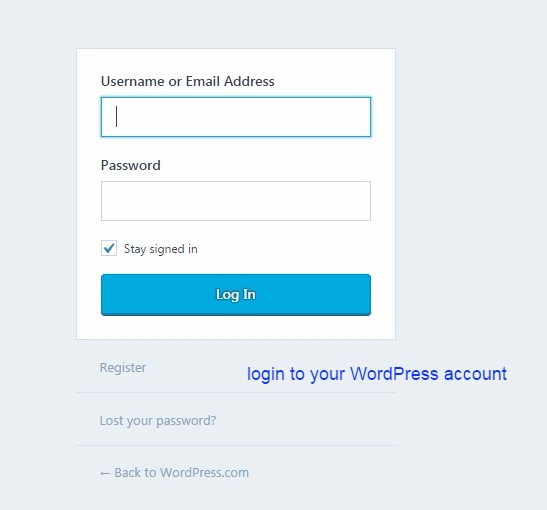
Now you can paste this code at the four most promising places. See the image below.
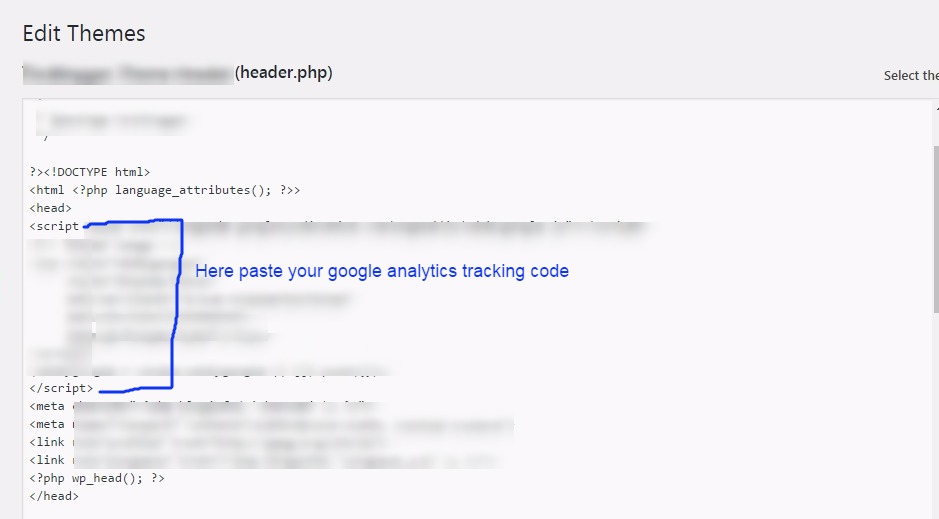
<head> section:

Click on the header.php file here you will get both the head and body sections. See the image below.

Here we are pasting the code inside the head section. See the image below.
<body> section:
This is the same procedure as the head section above, just paste the code inside the body tag, which is just below the head tag.
But for this section, you can create a new Google AdSense Ad unit, as it would be easy to track the performance of your Ad.
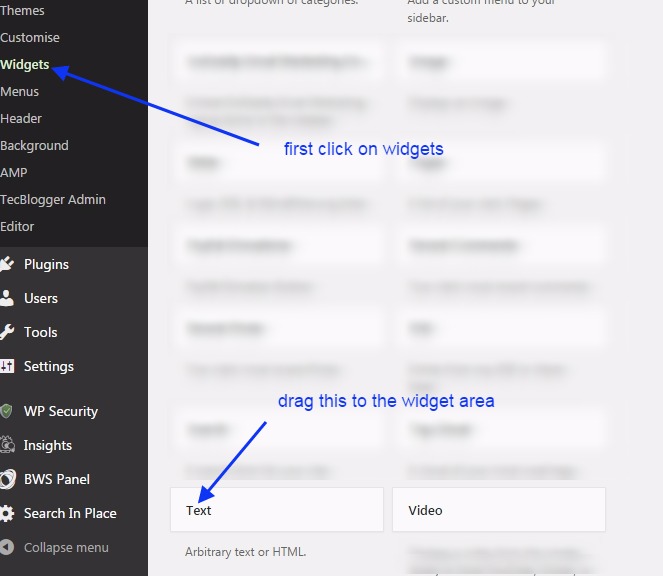
widget area: Click on the widget area. Here, you can drag and drop the text widget to the right sidebar or widget area.
See the image below. Create a new Google AdSense Ad unit for the widget area.
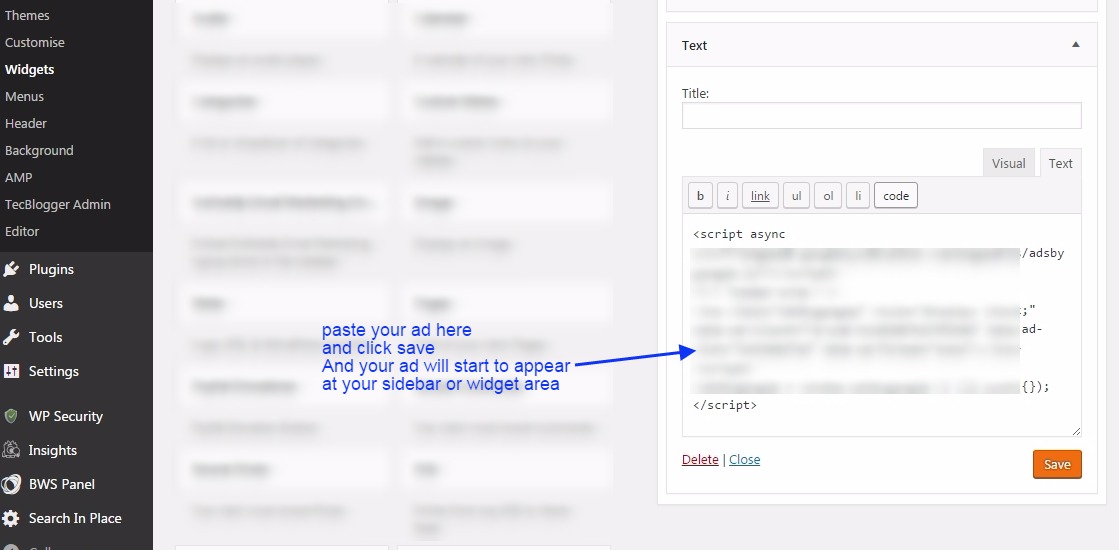
Here you can paste the code for the Ad unit. See the image below.
Post/Pages: Here you can paste the code inside posts or pages. You just need to open the post/page and then open it in text view,…
…and paste the code wherever you need to show it in your post. See the image below.

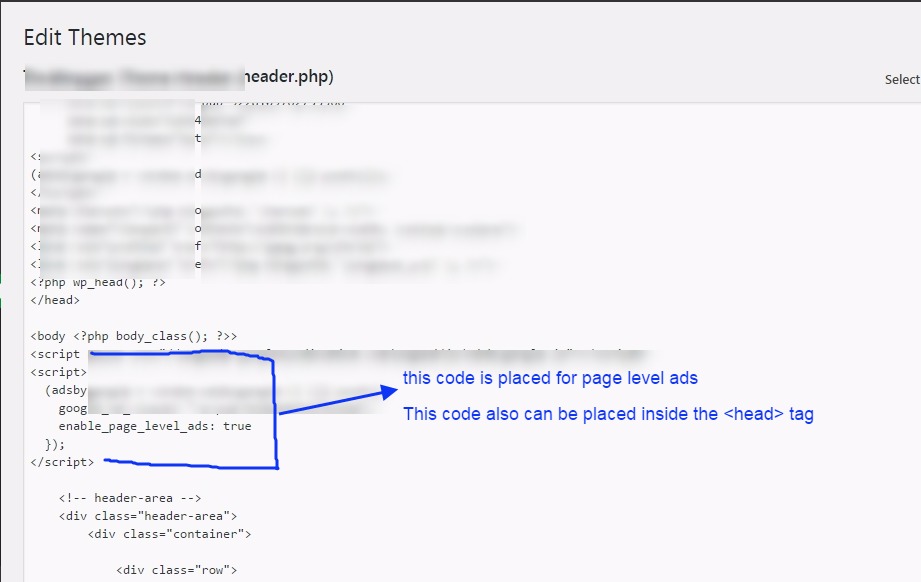
Page-Level-Ads: Here you will see how to place the code for page-level ads. You need to copy the code, and then you can either paste it inside the head or body section.
If you have already added your one Google AdSense ad unit inside the head section of this code, you can add this inside the body section.
Once you place this code inside the body section, ads will start to appear on your website pages. See the image below.

Here we paste this code inside the body tag. See the image below.
Conclusion:
In this blog post (How & Where to Place AdSense Code in Your Website), we explain how and where to place your Google AdSense code on your website or WordPress site. Google Adsense is one of the best affiliate programs for making money online, and it is a highly authentic way to monetize your blogging website or any other video platform, such as YouTube. In this blog, you will learn how to obtain the Google AdSense code and where to place it to start advertising on our website.
We have discovered where to put the AdSense code on my website. How do I add advertisements to my website? Where can I copy my AdSense code? How to add Google AdSense code to my site, Where to paste the ad code in your HTML, Google AdSense code example, How to paste AdSense code in HTML, Connect your site to AdSense WordPress|How & Where to Place AdSense Code in Your Website|
अगर आप adsense के बारें में अभी तक नहीं जानते है और आपने अपना adsense अकाउंट setup नहीं किया है तो आप adsense से रिलेटेड कुछ अच्छे और उपयोगी blogs नीचे दी हुई link से पढ़ सकते है |
If you are still unaware of the Adsense Account, or you have not set it up yet, then you can go through the links below related to the same.
Google Adsense Account Setup in Hindi…
Google AdSense account setup in English
How to enable or set up Google AdSense payment or AdSense address verification PIN?
Have you not received your Google AdSense PIN?
How To Submit Tax Information In Google AdSense in Hindi
How to Submit Tax Information Form in Google Adsense for YouTube and Blog
ADSENSE ADDRESS VERIFICATION PIN: FAQ
Where do I put the AdSense code on my website
How to create Ad units in Google AdSense
If you have any queries, please write to us at a5theorys@gmail.com, and we will respond ASAP.
Hope! You would have enjoyed this post about Google Adsense: How & Where to Place Adsense Code in Your Website?
Please feel free to give your important feedback in the comment section below. |How & Where to Place AdSense Code in Your Website|
Have a great time! Sayonara!
Hey everyone, we provide Air Conditioning Repair and see a lot of systems that fail from restricted airflow, worn components, or delayed maintenance. Many urgent comfort issues can be addressed with proper troubleshooting, safe repairs, and the right settings for the equipment. If anyone is dealing with home AC emergency, weak airflow, short cycling, unusual noises, or error codes, feel free to ask questions about 24-hour HVAC service and what to check before scheduling service.
Adult content is available on various adult websites for entertainment.
Always choose reliable adult sites for a protected experience.
顶级成人网站 提供高质量的成人娱乐内容。选择 可靠中心 以获得安全且愉快的观看体验。
Leave off for about 3 minutes and then plug the modem back only.
成人内容 可通过 安全且权威 的网站获取。探索 可靠平台 以获得高质量内容。
Amazing write ups. Thanks.
Well expressed really. .
Fantastic content, Regards.
Helpful knowledge, Cheers!
Many thanks! I enjoy it!
Seriously a lot of terrific material.
Thanks a lot, Loads of forum posts.
Really all kinds of useful info.
Good advice Cheers.
Whoa tons of useful info!
You’ve made your position very clearly!.
This is nicely said! .
Superb forum posts, Thanks.
Very good forum posts, Thanks a lot!
You actually expressed it exceptionally well.
Fine information Many thanks.
You have made your stand quite effectively.!
Useful data, Thanks a lot!
This is nicely said. !
Fantastic information, Regards!
Awesome posts Thank you.
Regards! I enjoy this!
Incredible loads of terrific knowledge.
Nicely put, Thank you.
Perfectly spoken without a doubt! .
Good tips, Kudos!
With thanks. Loads of information.
Nicely put. Cheers!
You revealed this well.
Information clearly considered!.
Helpful advice, Thanks.
Fine content, Cheers!
Perfectly expressed certainly. .
Appreciate it, Lots of write ups!
Kudos! Loads of data.
You actually explained that effectively!
You actually said it really well!
You explained it exceptionally well.
You actually said this very well.
Factor nicely utilized!.
You actually mentioned it well.
Wow a lot of great knowledge.
Fine knowledge Thank you!
With thanks! A good amount of write ups!
Hey there! Would you mind if I share your blog with my myspace
group? There’s a lot of folks that I think would really appreciate your content.
Please let me know. Many thanks