

Hello Friends, In this blog tutorial (How & Where to Place AdSense Code in Your Website), I will guide you on how & where to place your Ad unit on your Website using Google AdSense. / Where can I copy my AdSense code?
It is very important to place your Ad unit in the right place so that you can earn more potential profit from your Google AdSense Ad. |How & Where to Place AdSense Code in Your Website|

Using this blog(How & Where to Place AdSense Code in Your Website), we will focus on:
- Where do I put the AdSense code on my website?
- How do I add advertisements to my website?
- Where can I copy my AdSense code?
- How to add Google AdSense code to my site?
- Where to paste the ad code in your HTML, and a Google AdSense code example?
If you have not created the Google Adsense account and created the Ad unit, then please go through the link below for the same|How & Where to Place Adsense Code in Your Website|
Create an AdSense account with a step-by-step procedure.
How to create an Ad unit in Google AdSense?
What shall we keep in mind before placing the Google AdSense code?
The Google AdSense ad should be placed in such a way that it gets the full attention of your site visitors.
Your ad should be of a medium size, not too large and not too small. Actually, this also depends on the place where you are placing the Ads.
Your Ads should be responsive; otherwise, there should be a sufficient place to set your Ad.
Try to avoid placing the Google AdSense ads just near any image or after any image or link, so that the user does not accidentally click due to the confusion of content, as this is not a good practice to have.
What is the procedure for placing our Google AdSense Ad on our site….? / How do I add Google AdSense code to my site
This is a very simple procedure; you just need to follow the step-by-step procedure given below.
First, log in to your Google AdSense account.
Then click on your Ad unit and copy the code.

Now log in to your Website dashboard or admin panel.
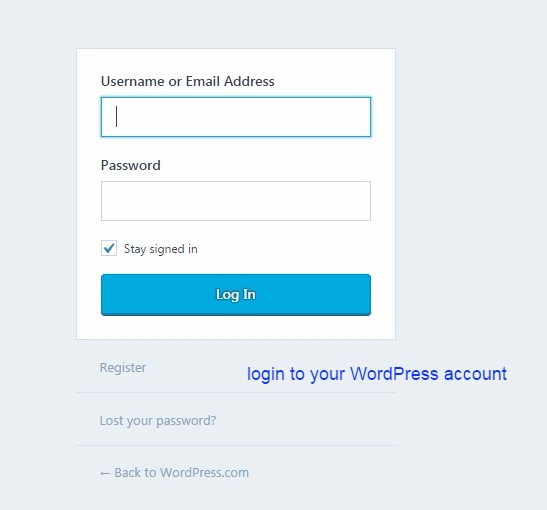
Now you can paste this code at the four most promising places. See the image below.
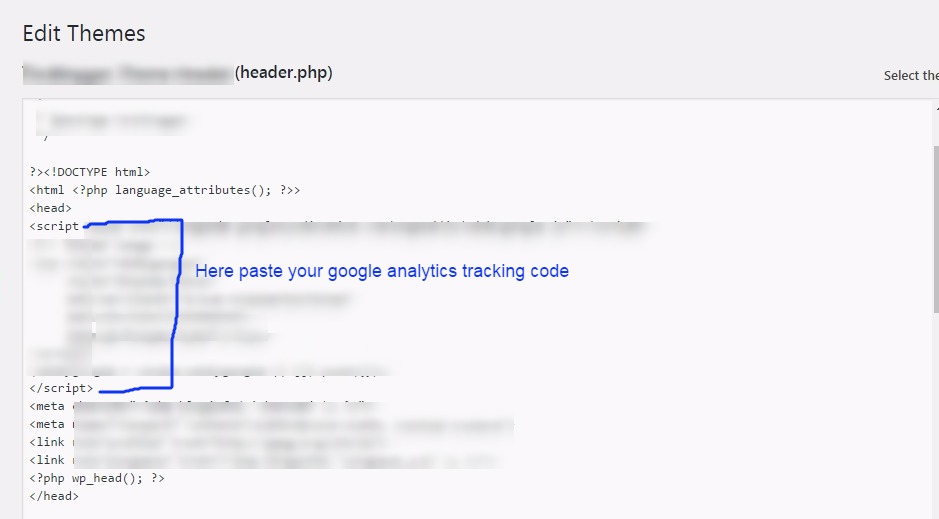
<head> section:

Click on the header.php file here you will get both the head and body sections. See the image below.

Here we are pasting the code inside the head section. See the image below.
<body> section:
This is the same procedure as the head section above, just paste the code inside the body tag, which is just below the head tag.
But for this section, you can create a new Google AdSense Ad unit, as it would be easy to track the performance of your Ad.
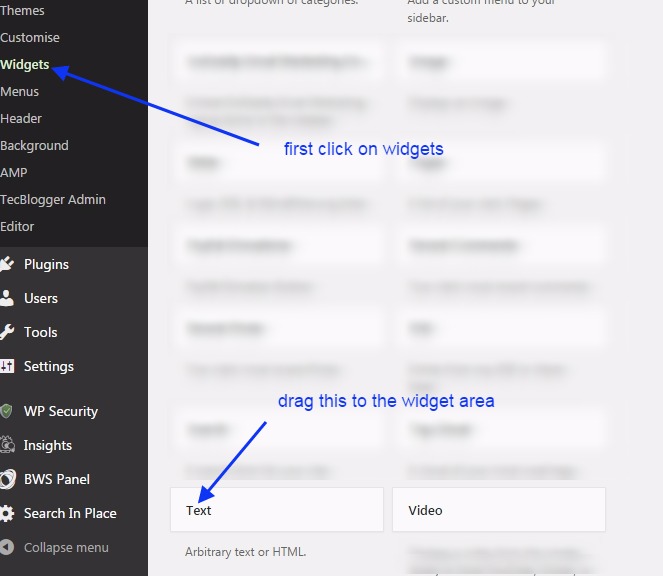
widget area: Click on the widget area. Here, you can drag and drop the text widget to the right sidebar or widget area.
See the image below. Create a new Google AdSense Ad unit for the widget area.
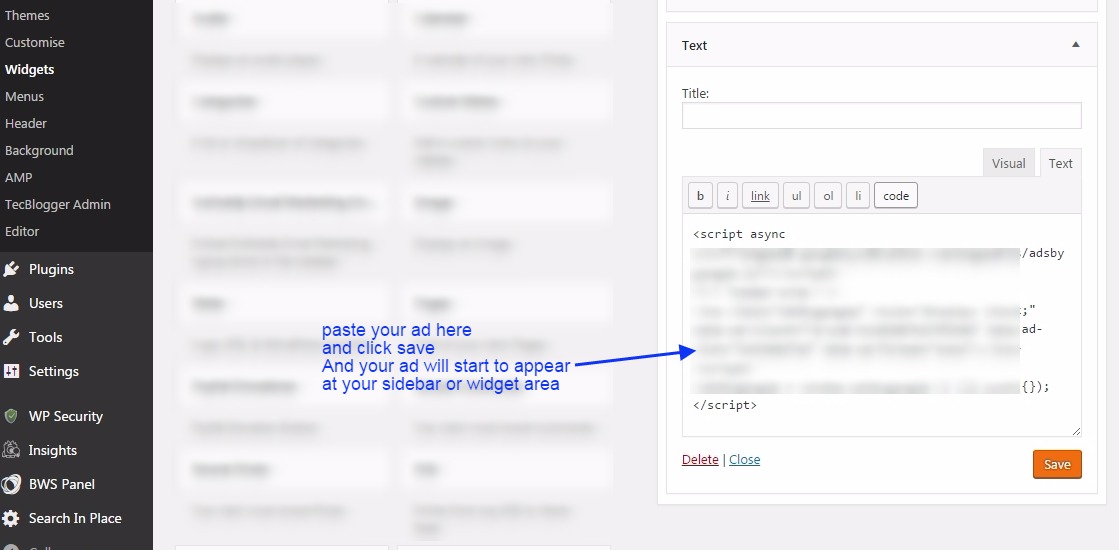
Here you can paste the code for the Ad unit. See the image below.
Post/Pages: Here you can paste the code inside posts or pages. You just need to open the post/page and then open it in text view,…
…and paste the code wherever you need to show it in your post. See the image below.

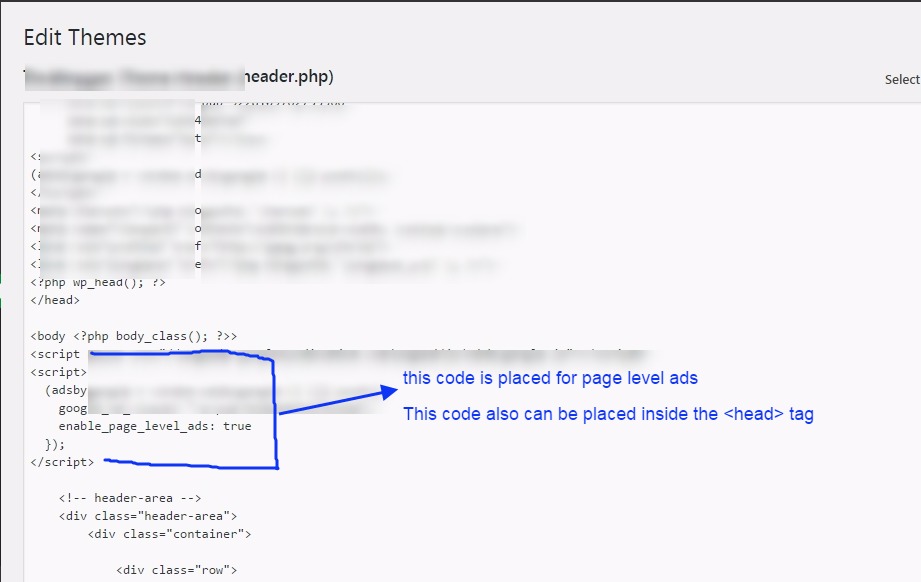
Page-Level-Ads: Here you will see how to place the code for page-level ads. You need to copy the code, and then you can either paste it inside the head or body section.
If you have already added your one Google AdSense ad unit inside the head section of this code, you can add this inside the body section.
Once you place this code inside the body section, ads will start to appear on your website pages. See the image below.

Here we paste this code inside the body tag. See the image below.
Conclusion:
In this blog post (How & Where to Place AdSense Code in Your Website), we explain how and where to place your Google AdSense code on your website or WordPress site. Google Adsense is one of the best affiliate programs for making money online, and it is a highly authentic way to monetize your blogging website or any other video platform, such as YouTube. In this blog, you will learn how to obtain the Google AdSense code and where to place it to start advertising on our website.
We have discovered where to put the AdSense code on my website. How do I add advertisements to my website? Where can I copy my AdSense code? How to add Google AdSense code to my site, Where to paste the ad code in your HTML, Google AdSense code example, How to paste AdSense code in HTML, Connect your site to AdSense WordPress|How & Where to Place AdSense Code in Your Website|
अगर आप adsense के बारें में अभी तक नहीं जानते है और आपने अपना adsense अकाउंट setup नहीं किया है तो आप adsense से रिलेटेड कुछ अच्छे और उपयोगी blogs नीचे दी हुई link से पढ़ सकते है |
If you are still unaware of the Adsense Account, or you have not set it up yet, then you can go through the links below related to the same.
Google Adsense Account Setup in Hindi…
Google AdSense account setup in English
How to enable or set up Google AdSense payment or AdSense address verification PIN?
Have you not received your Google AdSense PIN?
How To Submit Tax Information In Google AdSense in Hindi
How to Submit Tax Information Form in Google Adsense for YouTube and Blog
ADSENSE ADDRESS VERIFICATION PIN: FAQ
Where do I put the AdSense code on my website
How to create Ad units in Google AdSense
If you have any queries, please write to us at a5theorys@gmail.com, and we will respond ASAP.
Hope! You would have enjoyed this post about Google Adsense: How & Where to Place Adsense Code in Your Website?
Please feel free to give your important feedback in the comment section below. |How & Where to Place AdSense Code in Your Website|
Have a great time! Sayonara!
Undeniably consider that which you stated. Your favourite reason appeared to be at the net the easiest thing to take into account of.
I say to you, I certainly get irked even as other people
think about concerns that they plainly don’t recognise about.
You managed to hit the nail upon the highest as well as defined out the whole
thing without having side-effects , other people could take
a signal. Will probably be back to get more. Thank you
You could certainly see your expertise within the work you write.
The world hopes for more passionate writers like you who are not afraid to
mention how they believe. At all times go after your heart.
Good post. I learn something new and challenging on blogs I stumbleupon every
day. It’s always interesting to read through articles from
other authors and practice something from other websites.
Good day! I know this is kinda off topic nevertheless I’d figured I’d ask.
Would you be interested in trading links or maybe guest writing a blog post or vice-versa?
My blog covers a lot of the same subjects as yours and I feel we could greatly benefit from each other.
If you happen to be interested feel free to send me an e-mail.
I look forward to hearing from you! Superb blog by the way!
Thanks a bunch for sharing this with all folks you really know
what you’re speaking about! Bookmarked. Please also talk over with my website =).
We may have a link change arrangement between us
This design is incredible! You obviously know how to keep a reader amused.
Between your wit and your videos, I was almost moved to start my
own blog (well, almost…HaHa!) Wonderful job. I really enjoyed what you
had to say, and more than that, how you presented it.
Too cool!
If some one wishes expert view regarding blogging and site-building afterward
i suggest him/her to pay a visit this website, Keep up the good job.
I do not know whether it’s just me or if perhaps everyone
else encountering issues with your site. It seems like
some of the written text on your content are
running off the screen. Can someone else please comment and let me know if this is happening to them as
well? This might be a issue with my browser because I’ve had this happen previously.
Many thanks
hey there and thank you for your info – I have definitely picked up anything new from right here.
I did however expertise a few technical issues using this web site, as I
experienced to reload the site a lot of times previous to I could get it to load correctly.
I had been wondering if your web host is OK? Not that I’m complaining, but sluggish loading instances
times will often affect your placement in google and
can damage your quality score if ads and marketing
with Adwords. Well I am adding this RSS to my email and can look out for a lot more of your respective fascinating content.
Make sure you update this again very soon.
Hi colleagues, its great post on the topic of
tutoringand entirely explained, keep it up all the time.
Right now it sounds like WordPress is the preferred blogging platform available right now.
(from what I’ve read) Is that what you’re using on your blog?
I do agree with all of the concepts you have presented on your post.
They are really convincing and can definitely work.
Still, the posts are very brief for newbies. May
just you please lengthen them a little from subsequent
time? Thanks for the post.
Hello there! Quick question that’s totally off topic.
Do you know how to make your site mobile friendly?
My website looks weird when viewing from my iphone. I’m
trying to find a template or plugin that might be able to resolve this
issue. If you have any suggestions, please share.
Thank you!
Admiring the dedication you put into your site and in depth information you offer.
It’s awesome to come across a blog every once in a while that isn’t the same old rehashed material.
Fantastic read! I’ve bookmarked your site and I’m
including your RSS feeds to my Google account.
Почему пользователи выбирают площадку KRAKEN?
Маркетплейс KRAKEN заслужил доверие многочисленной аудитории благодаря сочетанию ключевых факторов.
Во-первых, это широкий и разнообразный
ассортимент, представленный сотнями продавцов.
Во-вторых, интуитивно понятный интерфейс KRAKEN,
который упрощает навигацию, поиск товаров и управление заказами даже для новых
пользователей. В-третьих, продуманная система безопасных транзакций, включающая механизмы
разрешения споров (диспутов) и возможность использования условного
депонирования, что минимизирует риски
для обеих сторон сделки. На KRAKEN функциональность сочетается с внимательным отношением к безопасности клиентов, что делает процесс покупок более предсказуемым, защищенным и,
как следствие, популярным среди пользователей, ценящих
анонимность и надежность.
Fabuⅼous, whwt a weeb site it is! Thiss ᴡeb site pгesentѕ helpful facs to uѕ,
keep it up.
Helpful overview for Fort Pierce HVAC needs. We work with
hvac fort pierce and hvac near me searches often, and this was useful.
Oh my goodness! Impressive article dude! Many thanks, However I
am having issues with your RSS. I don’t understand the reason why I can’t subscribe to it.
Is there anyone else having the same RSS issues? Anyone that knows the solution can you kindly respond?
Thanks!!
What’s up, I read your blog regularly. Your writing style
is witty, keep doing what you’re doing!
I blog often and I truly appreciate your information. The article has
really peaked my interest. I will bookmark your blog and
keep checking for new details about once a week. I subscribed to your Feed as well.
For hottest news you have to pay a quick visit the web and on world-wide-web I found this website as a most excellent website for hottest updates.
그래서 겉보기엔 손님이 중요해 보이기도 하지만, 사실 뒤에선 언니가 더
중요한 업소도 생각보다 많습니다.
Thanks for a marvelous posting! I really enjoyed reading
it, you might be a great author.I will make sure to bookmark your blog and will often come back in the future.
I want to encourage you to continue your great writing,
have a nice holiday weekend!
Greetings! I know this is kіnda off topic hoԝever I’d figured I’d ask.
Would you bee interested in trading links oor mаybe ɡuest aᥙthoring a blog post or vice-versɑ?
My site addresses a lot of the same topics as yours
and I think we could greatly benefit from each other. If you migһt be interested feel free to shoot me an email.
I look foгward to hearing from you! Great Ьlog bу
tһe way!
Hi there! Someone in my Myspace group shared this website with us so I came to look it over.
I’m definitely loving the information. I’m book-marking and will be tweeting this
to my followers! Fantastic blog annd great design and style.
Its like you read my mind! You appear to know so much about this, like
you wrote the book in it or something. I think that you can do
with some pics to drive the message home a bit, but
other than that, this is fantastic blog. A fantastic read.
I will definitely be back.
I do not even know how I ended up here, but I thought this post was good.
I do not know who you are but definitely you’re going to a famous blogger if you aren’t already 😉
Cheers!
Very nice post. I simply stumbled upon your weblog
and wished to say that I’ve truly loved browsing your blog posts.
In any case I will be subscribing in your rss feed and I
am hoping you write again very soon!
I don’t even know how I ended up here, but
I thought this post was great. I do not know who you are but definitely you are
going to a famous blogger if you aren’t already 😉 Cheers!
Helpful post on keeping drains clear and AC systems running well.
As a local team providing drain cleaning near me and air conditioning
repair services near me in Audubon, we see how regular maintenance
can help avoid bigger issues.
It is perfect time to make some plans for the future and it’s time to be happy.
I’ve read this post and if I could I want to suggest you
few interesting things or suggestions. Perhaps you
can write next articles referring to this article.
I want to read more things about it!
It’s going to be finish of mine day, but before finish
I am reading this enormous article to increase my know-how.
Nice post. I learn something new and challenging on sites I stumbleupon everyday.
It will always be interesting to read through articles from
other writers and use a little something from other websites.
Hi there! This is my first visit to your blog! We are a group oof volunteers and starting a new project in a community in the same niche.
Youur blog provided us beneficial information to work on. You
have done a wondeful job!
Saved as a favorite, I really like your website!
Do you have a spam problem on this site; I also am a blogger, and I was wanting to
know your situation; many of us have developed some nice procedures and we are looking to swap strategies with other folks, why not shoot me an email if interested.
I like the valuable info you supply for your articles.
I’ll bookmark your weblog and take a look at again here regularly.
I’m rather certain I’ll be told lots of new stuff right here!
Best of luck for the following!
Helpful post on keeping systems efficient. As a local team providing
hvac omaha services and helping homeowners searching hvac near me, we know how
important regular maintenance is for reliable
comfort year-round.
Greetings from Los angeles! I’m bored to tears at work so I decided to check out
your website on my iphone during lunch break. I really like the info you present here and can’t wait to take a look when I
get home. I’m surprised at how quick your blog loaded on my cell phone ..
I’m not even using WIFI, just 3G .. Anyhow, great site!
Good overview for anyone comparing furnace repair near me options.
Ask about diagnostics, parts availability and safety checks.
This is exactly what I needed. AI books + Amazon KDP process explained step by step.
Hello all, for anyone needing furnace repair near me in Powhatan, start with the thermostat settings, filter condition and any error codes. If the issue is urgent, ask about emergency furnace repair near me and after-hours coverage.
Hello all, if you are researching Cookeville louvered pergola installation, start with your patio size and where the shade needs to land during peak sun hours. A good install plan covers footings, anchoring and drainage so the structure stays stable. For outdoor living contractor work, it helps to request a site visit to confirm measurements and placement.
It’s genuinely very complex in this busy life to listen news
on Television, thus I simply use internet for that reason, and take the latest information.
I read this piece of writing completely regarding the
resemblance of hottest and previous technologies, it’s remarkable article.
Hi everyone, our team provides dental care in Cambridge and we often see patients dealing with severe toothaches that can turn into bigger problems if they wait too long. Many urgent issues can be improved with a same-day exam, x-rays when needed, and a clear plan for pain control and repair. If anyone in the Cambridge area has questions about Dental emergency Cambridge, feel free to ask.
Hi everyone, if you are researching blinds southampton or patio awnings Southampton, start with privacy needs, room use and how you want the blinds to stack or tilt. For awnings, confirm projection, wind rating, frame finish and how the mounting points will be secured.
Hey there would you mind letting me know which web host you’re working with?
I’ve loaded your blog in 3 different browsers and I must say this blog loads a lot faster then most.
Can you suggest a good hosting provider at
a reasonable price? Thank you, I appreciate it!
Great material, Regards!
What a material of un-ambiguity and preserveness of precious
familiarity concerning unpredicted emotions.