

Hello Friends, In this blog tutorial (How & Where to Place AdSense Code in Your Website), I will guide you on how & where to place your Ad unit on your Website using Google AdSense. / Where can I copy my AdSense code?
It is very important to place your Ad unit in the right place so that you can earn more potential profit from your Google AdSense Ad. |How & Where to Place AdSense Code in Your Website|

Using this blog(How & Where to Place AdSense Code in Your Website), we will focus on:
- Where do I put the AdSense code on my website?
- How do I add advertisements to my website?
- Where can I copy my AdSense code?
- How to add Google AdSense code to my site?
- Where to paste the ad code in your HTML, and a Google AdSense code example?
If you have not created the Google Adsense account and created the Ad unit, then please go through the link below for the same|How & Where to Place Adsense Code in Your Website|
Create an AdSense account with a step-by-step procedure.
How to create an Ad unit in Google AdSense?
What shall we keep in mind before placing the Google AdSense code?
The Google AdSense ad should be placed in such a way that it gets the full attention of your site visitors.
Your ad should be of a medium size, not too large and not too small. Actually, this also depends on the place where you are placing the Ads.
Your Ads should be responsive; otherwise, there should be a sufficient place to set your Ad.
Try to avoid placing the Google AdSense ads just near any image or after any image or link, so that the user does not accidentally click due to the confusion of content, as this is not a good practice to have.
What is the procedure for placing our Google AdSense Ad on our site….? / How do I add Google AdSense code to my site
This is a very simple procedure; you just need to follow the step-by-step procedure given below.
First, log in to your Google AdSense account.
Then click on your Ad unit and copy the code.

Now log in to your Website dashboard or admin panel.
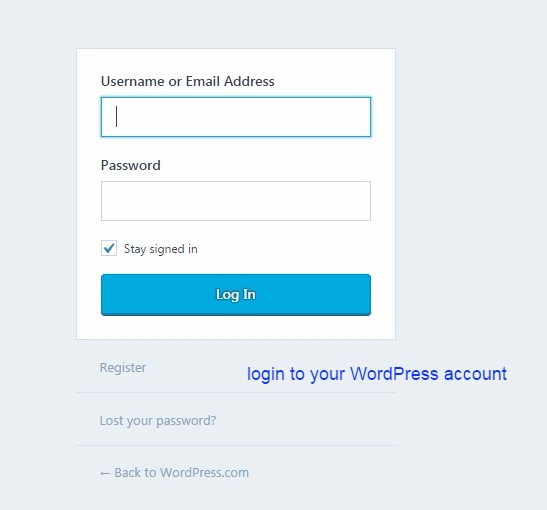
Now you can paste this code at the four most promising places. See the image below.
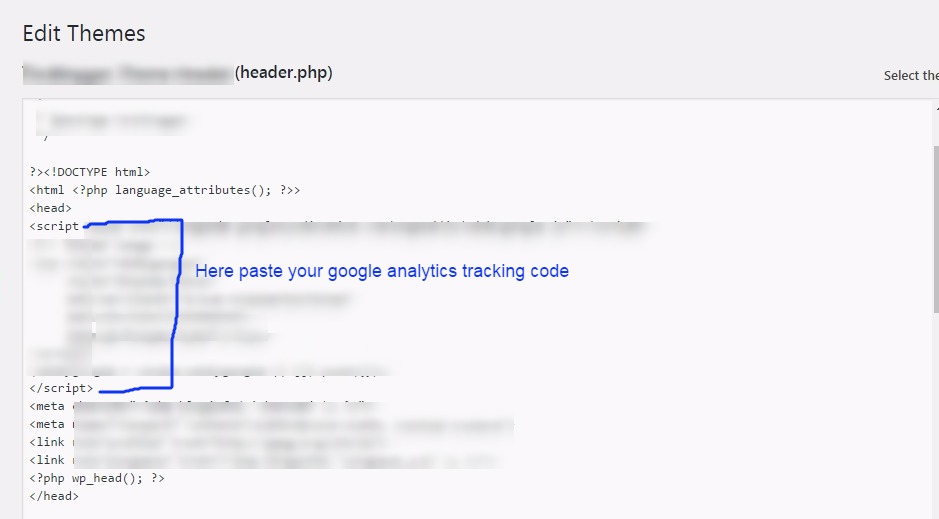
<head> section:

Click on the header.php file here you will get both the head and body sections. See the image below.

Here we are pasting the code inside the head section. See the image below.
<body> section:
This is the same procedure as the head section above, just paste the code inside the body tag, which is just below the head tag.
But for this section, you can create a new Google AdSense Ad unit, as it would be easy to track the performance of your Ad.
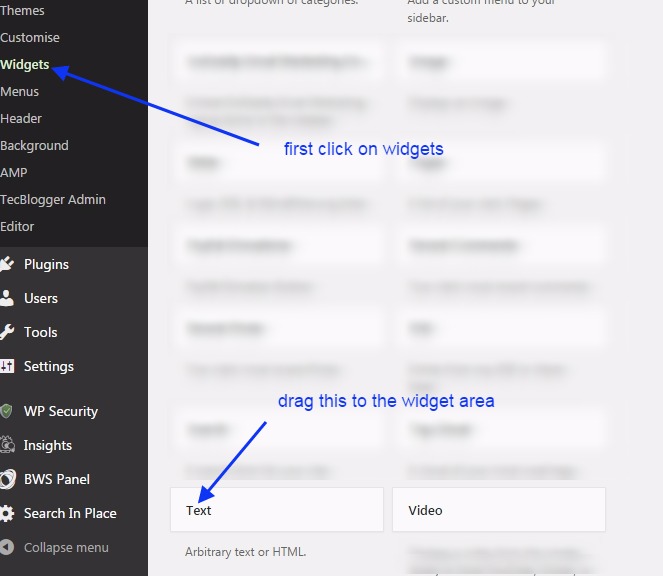
widget area: Click on the widget area. Here, you can drag and drop the text widget to the right sidebar or widget area.
See the image below. Create a new Google AdSense Ad unit for the widget area.
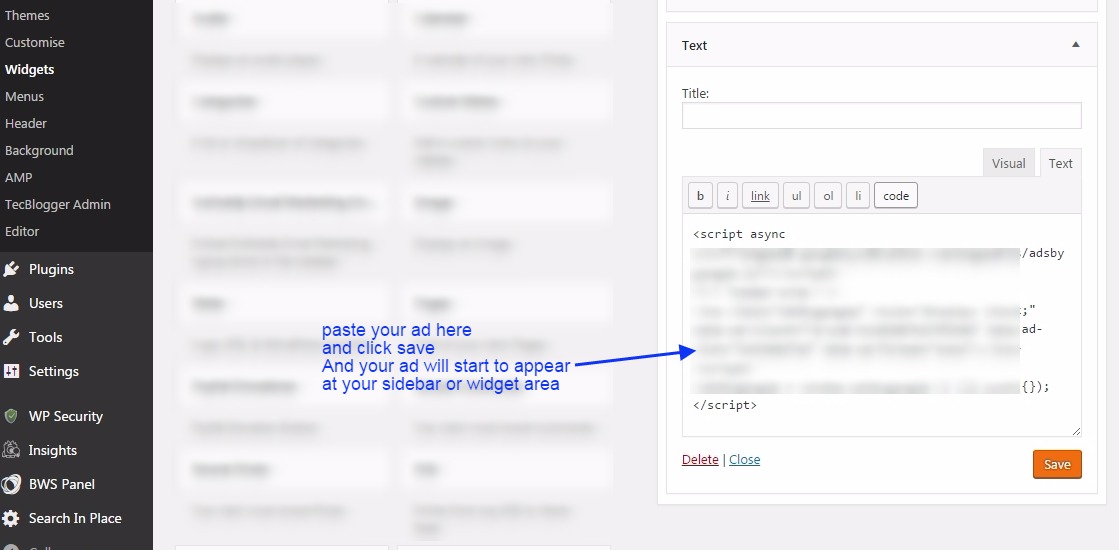
Here you can paste the code for the Ad unit. See the image below.
Post/Pages: Here you can paste the code inside posts or pages. You just need to open the post/page and then open it in text view,…
…and paste the code wherever you need to show it in your post. See the image below.

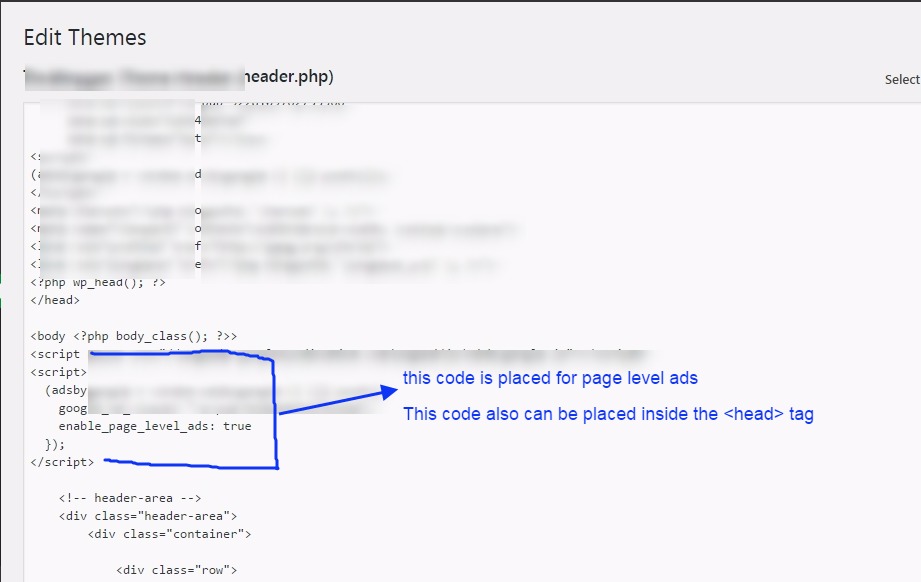
Page-Level-Ads: Here you will see how to place the code for page-level ads. You need to copy the code, and then you can either paste it inside the head or body section.
If you have already added your one Google AdSense ad unit inside the head section of this code, you can add this inside the body section.
Once you place this code inside the body section, ads will start to appear on your website pages. See the image below.

Here we paste this code inside the body tag. See the image below.
Conclusion:
In this blog post (How & Where to Place AdSense Code in Your Website), we explain how and where to place your Google AdSense code on your website or WordPress site. Google Adsense is one of the best affiliate programs for making money online, and it is a highly authentic way to monetize your blogging website or any other video platform, such as YouTube. In this blog, you will learn how to obtain the Google AdSense code and where to place it to start advertising on our website.
We have discovered where to put the AdSense code on my website. How do I add advertisements to my website? Where can I copy my AdSense code? How to add Google AdSense code to my site, Where to paste the ad code in your HTML, Google AdSense code example, How to paste AdSense code in HTML, Connect your site to AdSense WordPress|How & Where to Place AdSense Code in Your Website|
अगर आप adsense के बारें में अभी तक नहीं जानते है और आपने अपना adsense अकाउंट setup नहीं किया है तो आप adsense से रिलेटेड कुछ अच्छे और उपयोगी blogs नीचे दी हुई link से पढ़ सकते है |
If you are still unaware of the Adsense Account, or you have not set it up yet, then you can go through the links below related to the same.
Google Adsense Account Setup in Hindi…
Google AdSense account setup in English
How to enable or set up Google AdSense payment or AdSense address verification PIN?
Have you not received your Google AdSense PIN?
How To Submit Tax Information In Google AdSense in Hindi
How to Submit Tax Information Form in Google Adsense for YouTube and Blog
ADSENSE ADDRESS VERIFICATION PIN: FAQ
Where do I put the AdSense code on my website
How to create Ad units in Google AdSense
If you have any queries, please write to us at a5theorys@gmail.com, and we will respond ASAP.
Hope! You would have enjoyed this post about Google Adsense: How & Where to Place Adsense Code in Your Website?
Please feel free to give your important feedback in the comment section below. |How & Where to Place AdSense Code in Your Website|
Have a great time! Sayonara!
You actually suggested that terrifically.
Thank you a bunch for sharing this with all folks you actually know what you’re talking approximately!
Bookmarked. Kindly additionally discuss with my website
=). We may have a hyperlink trade contract between us
This is very interesting, You’re a very skilled blogger.
I’ve joined your rss feed and look forward to seeking more of
your fantastic post. Also, I’ve shared your website in my social networks!
Generally I don’t read post on blogs, but I wish to say that this write-up
very compelled me to check out and do it! Your writing style has been surprised me.
Thanks, very great post.
It’s awesome in favor of me to have a site, which is helpful in favor of my experience.
thanks admin
Awesome blog! Do you have any hints for aspiring writers?
I’m hoping to start my own blog soon but I’m a little lost on everything.
Would you suggest starting with a free platform like WordPress or go for a paid option? There are so many choices out there
that I’m completely confused .. Any suggestions? Kudos!
It’s amazing to visit this web site and reading the views of all mates regarding
this article, while I am also keen of getting knowledge.
When some one searches for his vital thing, thus he/she wishes to be available that in detail, so that thing is maintained over here.
You certainly would wish to get the most effective legal representative that can defend you in court.
Every weekend i used to visit this site, as i want
enjoyment, for the reason that this this site conations genuinely good funny data too.
Thanks for the marvelous posting! I really enjoyed reading
it, you might be a great author. I will ensure that I bookmark
your blog and may come back down the road. I want to encourage you to definitely continue your
great posts, have a nice evening!
Appreciation to my father who shared with me regarding this webpage, this webpage is truly remarkable.
I’m pretty pleased to find this website. I want to to
thank you for ones time for this wonderful read!!
I definitely savored every bit of it and I have you saved
to fav to check out new stuff on your blog.
Hey There. I found your blog using msn. This is an extremely well written article.
I’ll be sure to bookmark it and come back to read more of your useful info.
Thanks for the post. I will certainly return.
Hi there fantastic blog! Does running a blog such as this take a lot of work?
I have no understanding of computer programming but
I had been hoping to start my own blog in the near future.
Anyway, if you have any recommendations or tips for new blog owners please share.
I understand this is off subject however I just had
to ask. Many thanks!
Does your website have a contact page? I’m having a tough
time locating it but, I’d like to send you an email.
I’ve got some ideas for your blog you might
be interested in hearing. Either way, great blog and I look forward to seeing it
improve over time.
This information is priceless. How can I find out more?
I constantly emailed this website post page to all my contacts, because if like
to read it afterward my links will too.
I was wondering if you ever thought of changing the structure of your blog?
Its very well written; I love what youve got
to say. But maybe you could a little more in the way of content so people
could connect with it better. Youve got an awful lot of text for only having 1 or 2 pictures.
Maybe you could space it out better?
Hi, i read your blog from time to time and i own a similar one and i was just curious if you
get a lot of spam responses? If so how do you reduce
it, any plugin or anything you can advise? I get so much lately it’s driving me mad so any support is very much appreciated.
Good day! This is kind of off topic but I need
some guidance from an established blog. Is it difficult to set
up your own blog? I’m not very techincal but
I can figure things out pretty fast. I’m thinking about making my
own but I’m not sure where to begin. Do you have any tips or suggestions?
With thanks
Pretty section of content. I just stumbled upon your blog and
in accession capital to assert that I acquire actually enjoyed account your blog
posts. Any way I will be subscribing to your augment and even I achievement you access consistently rapidly.
Hi! This is my 1st comment here so I just wanted to give a quick shout out and tell you I
truly enjoy reading through your articles. Can you
suggest any other blogs/websites/forums that go over the same subjects?
Thanks!
What i do not understood is in fact how you are now
not actually a lot more well-favored than you might be now.
You’re very intelligent. You know therefore considerably on the subject of this matter,
made me in my view believe it from so many varied angles.
Its like women and men aren’t fascinated until it is something to accomplish with Girl
gaga! Your individual stuffs outstanding. All
the time maintain it up!
When I originally commented I clicked the “Notify me when new comments are added” checkbox and now
each time a comment is added I get several e-mails with the
same comment. Is there any way you can remove people from that service?
Thanks!
I’m really inspired along with your writing abilities and also with the
structure for your weblog. Is that this a paid topic or did you customize it yourself?
Anyway keep up the excellent quality writing, it’s rare to look a great blog like this one these days..
Simply wish to say your article is as astounding.
The clarity in your post is just spectacular and i could assume you’re an expert on this
subject. Well with your permission let me to grab your feed to keep updated with forthcoming post.
Thanks a million and please continue the enjoyable work.
Hello there! I know this is kinda off topic nevertheless I’d figured I’d ask.
Would you be interested in trading links or maybe guest authoring
a blog post or vice-versa? My website addresses a lot of the same topics as yours and
I believe we could greatly benefit from each other.
If you might be interested feel free to shoot me an e-mail.
I look forward to hearing from you! Awesome blog by
the way!
成人网站 提供广泛的成人娱乐视频选择。选择 安全的成人网站 以获得保密体验。
It’s hard to come by educated people on this subject, but you
seem like you know what you’re talking about!
Thanks
Luar biasa dengan pendapat ini. Terima kasih! Salam kenal.
View fentanyl information, including dose, uses, How to buy, Where to buy, side-effects, renal impairment, pregnancy, breast feeding, contra-indications and important safety information all at Berlusconimarket dot come. or say berlusconimarket.com .
โพสต์นี้ มีประโยชน์มาก ค่ะ
ดิฉัน ไปเจอรายละเอียดของ หัวข้อที่คล้ายกัน
สามารถอ่านได้ที่ betflix
สำหรับใครกำลังหาเนื้อหาแบบนี้
เพราะอธิบายไว้ละเอียด
ขอบคุณที่แชร์ บทความคุณภาพ นี้
จะรอติดตามเนื้อหาใหม่ๆ ต่อไป
Thank you for the auspicious writeup. It in fact was a amusement
account it. Look advanced to more added agreeable from you!
By the way, how could we communicate?
Новые порносайты предлагают
инновационный контент для развлечений для взрослых.
Откройте для себя безопасные новые платформы для современного опыта.
Почему пользователи выбирают площадку KRAKEN?
Маркетплейс KRAKEN заслужил доверие многочисленной аудитории благодаря
сочетанию ключевых факторов.
Во-первых, это широкий и разнообразный ассортимент, представленный сотнями продавцов.
Во-вторых, интуитивно понятный интерфейс KRAKEN, который упрощает навигацию, поиск товаров и управление заказами даже для новых пользователей.
В-третьих, продуманная система безопасных транзакций, включающая механизмы разрешения споров (диспутов) и возможность использования условного депонирования,
что минимизирует риски для обеих сторон
сделки. На KRAKEN функциональность сочетается с внимательным
отношением к безопасности
клиентов, что делает процесс покупок более
предсказуемым, защищенным и, как
следствие, популярным среди пользователей, ценящих анонимность
и надежность.
Hello, after reading this amazing paragraph i am as well glad to share my familiarity
here with mates.
Hi, i believe that i saw you visited my web site so i came to return the favor?.I am attempting to to find things to enhance my site!I assume
its adequate to use some of your ideas!!
Hi! I could have sworn I’ve been to this site before but after browsing
through many of the posts I realized it’s new to me.
Regardless, I’m definitely pleased I stumbled upon it and I’ll be bookmarking it and checking back regularly!
Mantap dengan postingan ini. Terima kasih! Salam kenal.
At this time it sounds like BlogEngine is the preferred blogging platform out there right now.
(from what I’ve read) Is that what you’re using on your blog?
Slažem se. Fiskalio je spas za moderno poslovanje.
Sve je čisto i jasno, a omjer cijene i kvalitete je povoljna za ono što
nude. Definitivno preporučujem.
I could not resist commenting. Well written!
Even if you’re at mistake, reporting the accident immediately makes certain that
the claims process can start.
Hello, after reading this awesome article i am as well happy to
share my knowledge here with colleagues.
Почему пользователи выбирают площадку KRAKEN?
Маркетплейс KRAKEN заслужил
доверие многочисленной аудитории благодаря сочетанию ключевых факторов.
Во-первых, это широкий и разнообразный ассортимент, представленный сотнями продавцов.
Во-вторых, интуитивно понятный интерфейс KRAKEN, который упрощает навигацию,
поиск товаров и управление заказами
даже для новых пользователей. В-третьих, продуманная система безопасных транзакций, включающая механизмы разрешения споров (диспутов) и возможность использования условного
депонирования, что минимизирует риски для обеих сторон сделки.
На KRAKEN функциональность сочетается с внимательным отношением к безопасности клиентов, что делает процесс покупок более предсказуемым, защищенным
и, как следствие, популярным среди пользователей, ценящих анонимность и надежность.
Почему пользователи выбирают площадку KRAKEN?
Маркетплейс KRAKEN заслужил
доверие многочисленной аудитории благодаря сочетанию ключевых факторов.
Во-первых, это широкий и разнообразный ассортимент, представленный сотнями продавцов.
Во-вторых, интуитивно понятный интерфейс
KRAKEN, который упрощает навигацию,
поиск товаров и управление заказами даже
для новых пользователей. В-третьих,
продуманная система безопасных транзакций, включающая механизмы разрешения споров (диспутов) и возможность использования условного депонирования, что минимизирует риски для обеих сторон сделки.
На KRAKEN функциональность сочетается с внимательным отношением к безопасности клиентов, что делает процесс покупок более предсказуемым, защищенным и, как следствие, популярным среди пользователей, ценящих анонимность и надежность.
Mantap dengan tulisan ini. Lanjutkan! Sukses selalu.
Because the admin of this site is working, no uncertainty very
quickly it will be famous, due to its feature contents.
Its like you read my mind! You appear to know so much about this, like you wrote the book in it or something.
I think that you can do with a few pics to drive the
message home a little bit, but other than that, this is great blog.
An excellent read. I will certainly be back.