

Introduction
हेलो दोस्तों, आज के ब्लॉग पोस्ट(Easy Process To Develop A Calculator Using Python In Hindi) में हम आपको Python के एक बहुत ही मजेदार और उपयोगी प्रोजेक्ट Calculator की जानकारी विस्तार से देने जा रहे है |
ऐसे प्रोजेक्ट को try करना beginners के लिए बहुत ही रोचक और उपयोगी अनुभव होता है | और यह प्रोजेक्ट उनके पाइथन प्रोग्रामिंग fundamentals को सीखने में बहुत ही मददगार होता है |
इस प्रोजेक्ट के माध्यम से आप यहाँ variables, user input, operators, और functions इत्यादि के बारे में सीखते है |
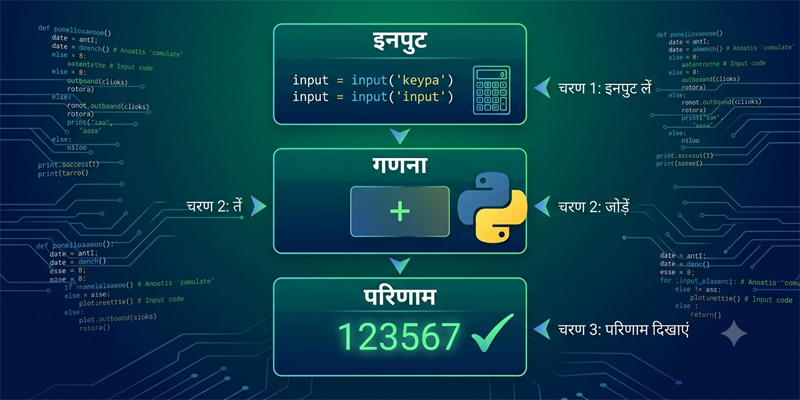
शुरू में beginners के लिए यह project हर तरह से सहायक है और उन्हें basic concepts की जानकारी देता है |
वैसे देखने में इस बेसिक प्रोजेक्ट को बनाना बहुत ही आसान और सरल लगता है|
पर असल में यही प्रोजेक्ट आपको Python के कुछ कोर logics की जानकारी देने वाला है|
जो कि आपके foundation को और मजबूती प्रदान करते है , और आगे जाकर आप आसानी से बड़े और complex real-world applications को develop कर पाते है |
इस तरह के सरल प्रोजेक्ट beginners के कॉन्फिडेंस को बढ़ाने का काम करते है |
क्योकि कुछ lines का कोड लिखने पर ही उन्हें यह रोमांचक अहसास होता है कि उन्होंने कुछ functional चीज़ रियल में develop कर ली है |
इस ब्लॉग में हम आपको step by step बताने जा रहे है कि Python में एक simple calculator कैसे develop करते है |
Python में Calculator प्रोग्राम बनाने से क्या फायदा है ?
Python के अंदर यह calculator प्रोजेक्ट बहुत ही सरल और छोटा project है |
और इस छोटे से प्रोजेक्ट के अंदर आपको एक ही जगह पर कई सारे programming concepts की जानकारी मिल जाती है |
इसलिए beginners के बीच यह प्रोग्राम बहुत ही चर्चित है |
Skills You Learn/Skills जो आप सीखते है
- Taking user input/यूजर से इनपुट लेना
- Using mathematical operators/मैथमेटिकल operators का उपयोग
- Working with functions/Functions के साथ काम
- Writing conditional statements/कंडीशनल स्टेटमेंट लिखना
- Understanding program flow/Program flow को समझना
Basic Python fundamentals को प्रैक्टिस करने के लिए यह प्रोग्राम सबसे ज्यादा उपर्युक्त है |
Easy Process To Develop A Calculator Using Python In Hindi Practically:
Step 1: Calculator के लॉजिक को समझिये
कोड लिखने से पहले आपको यह समझना बहुत ही जरुरी है कि calculator कैसे काम करता है |
एक calculator है वो सामान्यत:
- Takes two numbers as input/इनपुट में 2 नंबर्स को लेता है
- Asks the user to choose an operation/इसके बाद user से operation चयन के लिए पूंछता है
- Performs the calculation/calculation को perform करता है
- Displays the result/रिजल्ट को डिस्प्ले करता है
चार बेसिक operations कुछ इस तरह है:
- Addition
- Subtraction
- Multiplication
- Division
Step 2: एक सरल calculator program लिखिए
बेसिक calculator का कोड
num1 = float(input("Enter first number: "))
num2 = float(input("Enter second number: "))

operation = input("Enter operation (+, -, *, /): ")

if operation == "+":
    print("Result:", num1 + num2)

elif operation == "-":
    print("Result:", num1 - num2)

elif operation == "*":
    print("Result:", num1 * num2)

elif operation == "/":
    print("Result:", num1 / num2)

else:
    print("Invalid operation")
Step 3: Understanding the Code/Code की समझ
Taking User Input/यूजर इनपुट लेना
input()The input() The function allows users to enter data / user को डाटा enter करने के लिए allow करता है
Example:
num1 = float(input("Enter first number: "))float() का उपयोग करके user input को decimal नंबर में convert करता है |
Using Operators/Operators के साथ
Python कुछ mathematical operators provide करता है जैसे कि:
+for addition-for subtraction*for multiplication/for division
यह operators प्रोग्रामिंग के अंदर calculations परफॉर्म करते है |
Conditional statements का उपयोग
कौन सा ऑपरेशन परफॉर्म होगा, इसका पता लगाने के लिए Calculator if-else conditions का उपयोग करता है |
Example:
if operation == "+":If the user enters "+"Python performs addition.
Step 4: Calculator को रन करना
जब आप प्रोग्राम रन करते है तो फिर calculator निम्नलिखित विकल्प के लिए पूंछता है:
- First number
- Second number
- Operation symbol
Example
Enter first number: 10
Enter second number: 5
Enter operation (+, -, *, /): *
Output
Result: 50Calculator को functions की मदद से बेहतर करना
Functions जो है वो Calculator program को और भी साफ़ और सरल बना देते है |
Calculator में functions का उपयोग
def add(a, b):
    return a + b

def subtract(a, b):
    return a - b

def multiply(a, b):
    return a * b

def divide(a, b):
    return a / b

num1 = float(input("Enter first number: "))
num2 = float(input("Enter second number: "))

operation = input("Choose (+, -, *, /): ")

if operation == "+":
    print(add(num1, num2))

elif operation == "-":
    print(subtract(num1, num2))

elif operation == "*":
    print(multiply(num1, num2))

elif operation == "/":
    print(divide(num1, num2))

else:
    print("Invalid operation")
functions बेहतर क्यों होते है ?
Functions के बहुत सारे फायदे होते है:
- Cleaner code/कोड clean रहता है
- Better organization/organization बेहतर होता है
- Easy debugging/debugging आसान होती है
- Code reusability/कोड को आसानी से पुनः उपयोग कर सकते है
professional applications जो है वो functions पर बहुत ज्यादा निर्भर होती है |
कुछ और features को जोड़ना
एक बार जब आप बेसिक calculator को develop कर लेते है तो फिर आप उसमे और advanced features जोड़ सकते है |
improvement के लिए कुछ नुस्खे
- Percentage calculation
- Square root operation
- Power calculations
- GUI calculator using Tkinter
- Scientific calculator functions
ज्यादा features को add करने से आपकी coding skill और भी अच्छी होगी |
Beginners के द्वारा की जाने वाली कुछ आम गलतियां
1. Type conversion को भूल जाना
by default user के इनपुट को text की तरह ही treat किया जाएगा|
Incorrect:
num1 = input()Correct:
num1 = float(input())2. zero से devision
यह error देता है:
Example:
10 / 0Division को हमेशा सावधानी से हैंडल करिये|
3. गलत Indentation
पाइथन code blocks के लिए प्रॉपर indentation पर निर्भर रहता है |
Calculator project beginners के लिए किस तरह मददगार होता है
Calculator project ऐसे बहुत सारे महत्वपूर्ण प्रोग्रामिंग concepts समझाता है जो कि real-world applications को बनाने में बहुत ही उपयोगी होते है |
Benefits/फायदे
- Improves logical thinking/logical सोच को बढ़ता है
- Builds coding confidence/Coding confidence को बढ़ाता है
- Introduces real-world programming flow/real-world programming को समझाता है
- Strengthens Python fundamentals/Python fundamentals को मजबूत करता है
छोटे projects सिखने के हिसाब से बेहतर tools होते है |
Calculator लॉजिक का real-world में उपयोग
कैलकुलेटर प्रोग्राम का logic निम्नलिखित में भी पाया जाता है:
- Billing software
- Banking systems
- Financial applications
- Mobile apps
- Accounting software
ये यह दर्शाता है कि कैसे beginners project real-world software development से जुड़ा हुआ है |
Beginners के लिए बेस्ट practice
साफ़-सुथरा code लिखिए
proper formatting और meaningful variables का उपयोग करिये |
रोज़ अभ्यास(Practice) कीजिये
Calculator कोड को नए features के साथ modify करके देखिये | और निरंतर कोड की practice करिये |
Logic को समझिये
आपको किसी भी code को बिलकुल आंख बंद कर के copy और paste नहीं करना है |
बल्कि आपका focus इस बात को समझने में होना चाहिए कि प्रोग्राम की हर लाइन क्या और कैसे काम कर रही है |
इस project को करने के बाद क्या सीखना चाहिए ?
Calculator प्रोग्राम बनाने के बाद beginners निम्नलिखित concepts की तरफ move कर सकते है:
- Loops
- Functions
- GUI applications
- File handling
- Object-oriented programming
और भी ज्यादा advanced applications बनाने के लिए यह concepts बहुत ही मददगार और जरुरी होते है |
Conclusion
तो दोस्तों, इस ब्लॉग पोस्ट(Easy Process To Develop A Calculator Using Python In Hindi) में हमने सीखा कि कैसे Python में एक basic calculator प्रोग्राम को develop करें | सरल और basic होने के वाबजूद यह प्रोग्राम आपको programming के कुछ ऐसे महत्वपूर्ण और core concepts सिखाता है जो कि आने वाले समय में आपके लिए एक मजबूत foundation का काम करते है |
और आप आसानी से complex programs अथवा real-world projects पर काम कर पाते है | इसके साथ साथ आपको user inputs, ऑपरेटर्स, conditions, और functions का भी practically knowledge होता है |
programming के परिपेक्ष में एक बात बिलकुल सत्य है कि चाहे program सरल हो या फिर advanced, बिना practice और consistency के आप उस पर command नहीं कर सकते है | इसलिए अगर आप एक professional और sound प्रोग्रामर बनना चाहते है तो फिर आप पहले basic programs को बनाइये उस पर खूब practice और experiment करिये, और इसके बाद धीरे धीरे आप advanced प्रोग्रामिंग की तरफ कदम रखिये और real-world प्रोजेक्ट पर काम करिये |
इस ब्लॉग को लेकर आपके मन में कोई भी प्रश्न है तो आप हमें इस पते support@a5theory.comपर ईमेल लिख सकते है|
आशा करता हूँ, कि आपने इस पोस्ट(Easy Process To Develop A Calculator Using Python In Hindi) को खूब एन्जॉय किया होगा|
आप स्वतंत्रता पूर्वक अपना बहुमूल्य फीडबैक और कमेंट यहाँ पर दे सकते है|
आपका समय शुभ हो|