

Introduction
In this blog post(Common Python Errors), we are going to discuss common errors made by beginners, mostly while programming in the Python language.
It is very natural to make errors while programming; it is a part of programming.
And it does not matter whether you are a beginner or a professional; you can encounter errors at any time while programming.
Sometimes errors can be frustrating too, but in reality, they are very important in programming.
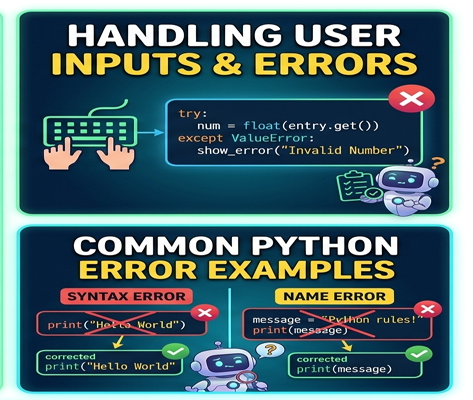
They make us learn a few deep concepts of programming that we could not have reached before getting this error.
They improve our debugging skills in programming, which is one of the best skills of a perfect programmer.
It is very helpful for beginners to have the knowledge of a few basic and common Python errors.
They can minimise their confusion and enhance their confidence after dealing with such errors in coding.
So we are going through a few common Python errors that are made by beginners.
We will analyze why such errors are made and how effectively we can solve them.
What Are Python Errors? / Common Python Errors
Python errors occur when the program cannot execute correctly due to mistakes in the code.
Errors generally happen because of:
- Incorrect syntax
- Wrong logic
- Invalid operations
- Missing values
- Typing mistakes
Python usually displays an error message that helps identify the problem.
1. SyntaxError
What Is a SyntaxError?
A SyntaxError happens when Python cannot understand the code because the syntax is incorrect.
Example
Incorrect:
print("Hello"Problem
The closing parenthesis is missing.
Correct Code
print("Hello")How to Avoid SyntaxError
- Check brackets and quotation marks carefully
- Use proper punctuation
- Read error messages line by line
Syntax errors are among the most common mistakes beginners make.
2. IndentationError
What Is IndentationError?
Python uses indentation to define blocks of code. Incorrect spacing causes an IndentationError.
Example
Incorrect:
if True:
print("Python")
Correct Code
if True:
    print("Python")
Why Indentation Matters
Unlike many programming languages, Python relies heavily on proper spacing and structure.
3. NameError
What Is NameError?
A NameError occurs when you use a variable or function that has not been defined.
Example
Incorrect:
print(age)Correct Code
age = 25

print(age)
How to Avoid NameError
- Define variables before using them
- Check spelling carefully
- Use meaningful variable names
4. TypeError
What Is TypeError?
A TypeError happens when incompatible data types are used together.
Example
Incorrect:
print("Age: " + 25)Correct Code
print("Age:", 25)or
print("Age: " + str(25))Why This Happens
Python does not allow combining text and numbers directly without conversion.
5. ZeroDivisionError
What Is ZeroDivisionError?
This error occurs when a number is divided by zero.
Example
Incorrect:
print(10 / 0)How to Fix It
Always ensure the denominator is not zero before division.
Example:
num = 0

if num != 0:
    print(10 / num)
else:
    print("Cannot divide by zero")
6. IndexError
What Is IndexError?
An IndexError occurs when accessing an invalid position in a list.
Example
Incorrect:
numbers = [1, 2, 3]

print(numbers[5])
Why It Happens
The list contains only three items, but the index 5 does not exist.
How to Avoid It
Check the list length before accessing the indexes.
7. KeyError
What Is KeyError?
A KeyError happens when trying to access a dictionary key that does not exist.
Example
Incorrect:
student = {"name": "Alex"}

print(student["age"])
Correct Approach
print(student.get("age"))Using get() helps avoid errors.
8. ModuleNotFoundError
What Is ModuleNotFoundError?
This error occurs when Python cannot find a library or module.
Example
import pandasIf the library is not installed, Python shows an error.
How to Fix It
Install the required library using:
pip install pandas9. ValueError
What Is ValueError?
A ValueError occurs when the correct data type is used, but the value is invalid.
Example
Incorrect:
int("Python")Why It Happens
The word "Python" cannot be converted into an integer.
10. Infinite Loops
What Is an Infinite Loop?
An infinite loop runs continuously without stopping.
Example
Incorrect:
while True:
    print("Hello")
How to Avoid It
Always provide a stopping condition.
Why Debugging Skills Are Important
Debugging means identifying and fixing errors in a program.
Benefits of Debugging
- Improves logical thinking
- Helps understand program flow
- Builds coding confidence
- Makes problem-solving easier
Strong debugging skills are essential for every programmer.
Tips for Fixing Python Errors
Read Error Messages Carefully
Python error messages often clearly explain the problem.
Check Line Numbers
Most errors mention the exact line where the issue occurred.
Use Small Code Blocks
Testing smaller sections of code makes debugging easier.
Practice Regularly
The more you code, the easier it becomes to recognize and fix errors.
Best Practices to Avoid Errors
Write Clean Code
Organized code reduces mistakes.
Use Meaningful Variable Names
Readable code is easier to debug.
Test Frequently
Run programs regularly instead of waiting until the end.
How Errors Help You Learn
Although errors may seem frustrating at first, they actually improve programming skills. Every mistake teaches something valuable about logic, syntax, and problem-solving.
Experienced developers still encounter errors daily—the difference is that they know how to debug efficiently.
What to Learn After Debugging Basics
After understanding common errors, beginners should move on to:
- Exception handling
- Functions and modules
- File handling
- APIs
- Object-oriented programming
These concepts help in building stronger applications.
Conclusion
So, Friends, in this blog post(Common Python Errors), we have learnt about some common Python errors that a beginner can make most often. Errors are an important part of good programming as they teach you how to debug the code and improve your programming skills to the next level. Making errors is very common, especially with beginners who have just started to learn Python. But it is more important to understand the Python errors and try to fix them, which would surely boost beginners’ confidence, debugging skills, and make them professional programmers.
In a beginner’s programming journey, encountering syntax errors, indentation mistakes, type mismatches, and runtime issues are all normal learning experiences. So beginners should never fear errors; rather, they should see them as a chance to improve their debugging skills in order to enhance their overall programming strength.
Practice regularly, debug patiently, and keep learning from every mistake is the only key to becoming a good and professional programmer.
If you have any queries, you can write to us at support@a5theory.com. We will get back to you ASAP.
Hope! You would have enjoyed this post(Common Python Errors).
Please feel free to give your important feedback in the comment section below.
Have a great time!