

Hello Friends, in this blog post, we are going to a fascinating comparison of Microsoft 365 vs. Office 2024.
Choosing between Microsoft 365 and Microsoft Office 2024 can be confusing, especially when you need Excel, Word, and PowerPoint for school, college, office work, or business.
Though these all productive applications access are provided by both software still they are different in their included service, payment models, and upgrade policies.
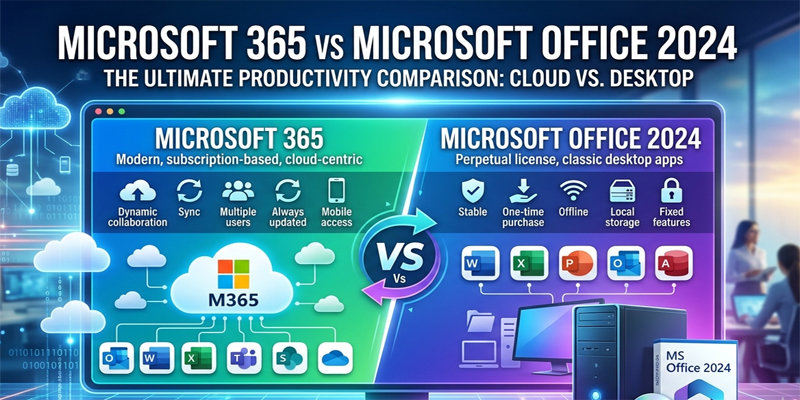
Microsoft 365 offers ongoing feature updates, additional services, and cloud storage to all eligible users and works on a subscription basis.
Office 2024 comes with a defined set of classic desktop applications for one PC or Mac, and these are all available at a one-time purchase.
So, it is important to know that:
- Which option offers better value in India in 2026?
- Should you pay once and use Office 2024, or choose a subscription with Microsoft 365?
In this post, we are going to explore Microsoft 365 vs. Office 2024 along with their applications…
… prices, cloud storage, features, device limits, and long-term costs in easy-to-understand language.
Note: Prices in this article “Microsoft 365 vs Office 2024” reflect Microsoft’s India store listings available at the time of research. They may change, so check the official website before purchasing.
What Is Microsoft 365?
Microsoft 365 is a subscription-based productivity service from Microsoft. Depending on the plan, it includes desktop applications, web and mobile access, OneDrive cloud storage, collaboration tools, security features, and AI-powered capabilities.
Popular plans for individual and household users include Microsoft 365 Personal, Microsoft 365 Family, and Microsoft 365 Premium.
With an eligible subscription, you can use applications such as Word, Excel, PowerPoint, Outlook, and OneNote. Some plans also provide access to additional services and advanced Copilot features.
Microsoft 365 is particularly useful for people who work across multiple devices or want cloud storage and continuously updated applications. <Cite refs={[“turn753217search2″,”turn753217search3”]}/>
What Is Microsoft Office 2024?
Microsoft Office 2024 is a traditional one-time-purchase version of Office. You pay once for the edition you select and receive its included applications for one PC or Mac.
For example, Office Home 2024 includes classic desktop versions of Word, Excel, PowerPoint, and OneNote. Microsoft lists this edition for non-commercial use.
If you need Outlook and commercial-use rights, Office Home & Business 2024 is a separate option. It includes Word, Excel, PowerPoint, Outlook, and OneNote for one PC or Mac. <Cite refs={[“turn753217search4″,”turn753217search6”]}/>
Office 2024 is designed for users who prefer a fixed purchase rather than a recurring subscription. It receives security updates during its supported lifecycle, but purchasing it does not include future major Office versions.
Microsoft 365 vs Office 2024: Quick Comparison
| Feature | Microsoft 365 Personal | Office Home 2024 |
|---|---|---|
| Payment model | Monthly or annual subscription | One-time purchase |
| Indicative India price | ₹6,899/year or ₹689/month | ₹10,999 once |
| Included desktop apps | Word, Excel, PowerPoint, Outlook, OneNote | Word, Excel, PowerPoint, OneNote |
| Device usage | Sign in on multiple devices; use on up to five simultaneously | One PC or Mac |
| Cloud storage | 1TB OneDrive storage | No bundled paid storage; Microsoft account storage is separate |
| New feature updates | Included while subscribed | No future major-version upgrade included |
| AI features | Available according to plan and eligibility | Subscription-level Copilot benefits are not included |
| Primary use | Personal productivity across devices | Home and school use on one computer |
Microsoft’s official store lists these prices and core differences. Microsoft 365 Family and Premium offer different benefits and sharing arrangements, while Office Home & Business 2024 is available separately for commercial use. <Cite refs={[“turn753217search2″,”turn753217search4″,”turn753217search6″,”turn753217search8”]}/>
1. Price Comparison: Which Is Cheaper?
Price is often the first factor buyers consider.
According to Microsoft’s India store listings at the time of research, the following options are available:
| Product | Indicative price in India | Payment type |
|---|---|---|
| Microsoft 365 Personal | ₹689/month | Subscription |
| Microsoft 365 Personal | ₹6,899/year | Subscription |
| Microsoft 365 Family | ₹8,199/year | Subscription |
| Microsoft 365 Premium | ₹19,999/year | Subscription |
| Office Home 2024 | ₹10,999 | One-time purchase |
| Office Home & Business 2024 | ₹27,999 | One-time purchase |
These prices are based on Microsoft’s published India store listings and are subject to change.
Which option costs less over time?
Let’s compare Microsoft 365 Personal with Office Home 2024.
- Office Home 2024 costs ₹10,999 as a one-time purchase.
- Microsoft 365 Personal costs ₹6,899 per year at the listed annual rate.
- Two years of Microsoft 365 Personal would cost ₹13,798 at that rate.
- Three years would cost ₹20,697 if the annual price remained unchanged.
On purchase price alone, Office Home 2024 becomes cheaper over a period longer than approximately 19 months, assuming you would otherwise renew Microsoft 365 Personal at the listed annual rate.
However, this is not a direct feature-for-feature comparison. Microsoft 365 Personal includes Outlook, 1TB of OneDrive storage, multiple-device use, and subscription benefits that Office Home 2024 does not bundle in the same way.
Verdict: Office 2024 may cost less over the long term if you need only its included applications on one computer. Microsoft 365 may offer better value if you will actively use its cloud storage, extra devices, and other subscription benefits.
2. Applications and Features
Both options provide familiar productivity applications, but their included features differ.
Microsoft 365
Depending on the subscription, Microsoft 365 can provide:
- Word for creating and editing documents.
- Excel for spreadsheets, calculations, and data analysis.
- PowerPoint for presentations.
- Outlook for email and calendar management.
- OneNote for digital notes.
- OneDrive cloud storage.
- Additional services and eligible AI features.
Subscribers receive ongoing feature updates while their subscriptions remain active. Specific features can vary by plan, platform, and account type.
Office 2024
Office Home 2024 includes:
- Word for documents.
- Excel for spreadsheets.
- PowerPoint for presentations.
- OneNote for notes and organisation.
Office Home & Business 2024 additionally includes Outlook and is intended for users who need commercial-use rights.
Office 2024 provides the included applications without requiring an annual renewal, but new major-version upgrades are not included in the original purchase.
Verdict: If you want the classic applications for routine offline work, Office 2024 may be sufficient. If you want a broader collection of services and continuing feature updates, Microsoft 365 is the more flexible option.
3. Cloud Storage: An Important Difference
Cloud storage can be one of the biggest advantages of Microsoft 365.
Microsoft 365 Personal includes 1TB of OneDrive storage, according to Microsoft’s India store listing. This space can be useful for documents, photos, videos, and backups, subject to the service’s terms and storage limits.
For example, imagine you are editing a report on your laptop and need to review it later on another computer. If the file is stored in OneDrive, you can access it from another compatible device after signing in.
Office Home 2024 does not include the same bundled 1TB paid storage benefit. You can still use a Microsoft account’s separately available free storage or purchase cloud storage independently.
Cloud storage can also help protect against the loss of a device, but it should be configured correctly and should not automatically be treated as a complete backup strategy.
Which is better?
Choose Microsoft 365 if you frequently access files across devices, share documents, or need substantial cloud storage. Office 2024 is suitable if you primarily save files locally and already have another storage or backup solution.
4. Device Limits and Flexibility
How many devices you use can affect your decision.
Microsoft 365
Microsoft 365 Personal allows you to install the apps on your devices and remain signed in on up to five devices simultaneously. Eligible apps can be used on PCs, Macs, phones, and tablets.
Microsoft 365 Family is designed for sharing subscription benefits with up to six people, with individual accounts and separate storage allowances according to the plan’s terms.
Office 2024
Office Home 2024 is licensed for installation on one PC or Mac. If you need Office on another computer, check the licence terms and purchase requirements before assuming that the same licence can cover both devices.
Verdict: Microsoft 365 is generally better for people working across several devices or sharing benefits with eligible family members. Office 2024 suits users who primarily work on one computer.
5. Updates, Security, and Future Versions
Microsoft 365 and Office 2024 differ in how they receive new features.
Microsoft 365 subscribers receive ongoing feature updates, security updates, and bug fixes while their subscription is active and their applications remain supported.
Office 2024 receives security updates during its supported lifecycle, but it does not automatically become the next major Office version. If you later want a newer major release, you generally need to purchase it separately.
This distinction matters if you want to use the latest eligible features without making another major-version purchase.
However, ongoing updates do not mean that every feature is available on every device or subscription. Some capabilities are limited by the operating system, application version, licence, and account type.
Verdict: Microsoft 365 is a better fit for users who prioritise ongoing feature updates. Office 2024 can suit people who prefer a defined set of applications and are comfortable keeping that version for its supported lifecycle.
6. Which Option Is Better for Students?
Students often need Word for assignments, Excel for calculations, and PowerPoint for presentations.
Office Home 2024 may be sufficient if a student works mainly on one computer and wants to avoid an ongoing subscription. It offers the classic applications needed for many school and college tasks.
Microsoft 365 may be more useful if a student works on multiple devices, needs cloud storage, collaborates on group projects, or wants access to eligible additional features.
Students should also check whether their school or college provides Microsoft 365 through an eligible educational account. Access and included features depend on the institution’s licence.
Recommendation: Choose Office Home 2024 for basic, single-computer use if its licence suits your situation. Consider Microsoft 365 if you will benefit from OneDrive, multi-device use, and collaboration.
7. Which Option Is Better for Professionals and Businesses?
For professionals, the choice depends on how they work and which applications they need.
Microsoft 365 may be suitable for people who collaborate on documents, use cloud storage, work across devices, and benefit from ongoing updates.
Office Home 2024 is labelled for non-commercial use, so it should not be treated as the correct licence for every workplace situation.
Office Home & Business 2024 is a separate one-time-purchase edition that includes Outlook and commercial-use rights. Businesses that require organisational email, administration, shared storage, or collaboration services should also compare Microsoft’s business subscriptions rather than focusing only on the home editions.
Recommendation: Home users and students should compare Personal and Home editions. Professionals and business owners should carefully check commercial-use rights and the services included in each licence.
8. Can You Use Microsoft Office for Free?
Yes. Microsoft provides free web versions of applications such as Word, Excel, and PowerPoint. You can access them through a browser using a Microsoft account. Their functionality differs from that of the fully installed desktop applications.
Free web apps may be sufficient if you mainly create documents, perform basic spreadsheet tasks, or prepare simple presentations.
However, advanced desktop features, offline access, storage allowances, and AI capabilities may differ from paid products.
If you are unsure whether you need a paid licence, try the free web applications first and identify any limitations that affect your work.
Microsoft 365 vs Office 2024: Final Recommendation
There is no single winner for every user. The right choice depends on how many devices you use, whether you need cloud storage, how much you value ongoing feature updates, and whether the licence matches your intended use.
| Your requirement | Recommended option |
|---|---|
| One-time payment for home or school use | Office Home 2024 |
| Work across several devices | Microsoft 365 Personal |
| Share benefits with family members | Microsoft 365 Family |
| 1TB cloud storage and ongoing feature updates | Microsoft 365 Personal |
| One-time purchase with Outlook and commercial-use rights | Office Home & Business 2024 |
| Basic document editing without a paid licence | Free Microsoft 365 web apps |
Our verdict
Friends, in this post, we have seen a useful comparison of Microsoft 365 vs Office 2024. Office 2024 is a fascinating option for those users who demand Word, Excel, PowerPoint, and OneNote. It is very economical until you ask for any additional service included with Microsoft 365, as it is a one-time purchase software application.
For people who work across devices, need 1TB of cloud storage, and value ongoing features, Microsoft 365 Personal could be the right selection. Microsoft 365 Family can be worth considering when there are multiple accounts and subscription benefits are given to lots of people.
Always remember to check a few parameters before purchasing, like supported operating systems, current price, included applications, licence conditions, and feature availability on the official Microsoft website.
It is not always worth paying a low price for the product at checkout. The product should meet your requirements fully rather than paying for the features that you are never going to use.
Disclaimer: Prices and plan benefits described in this article “Microsoft 365 vs Office 2024” can change. This article is for general informational purposes. Confirm current pricing, licensing terms, and product details with Microsoft before purchasing.
If you have any queries, you can write to us at support@a5theory.com; we will get back to you ASAP.
Hope! You will have enjoyed this post, “Microsoft 365 vs Office 2024“.
Please feel free to give your important feedback in the comment section below.
Have a great time!